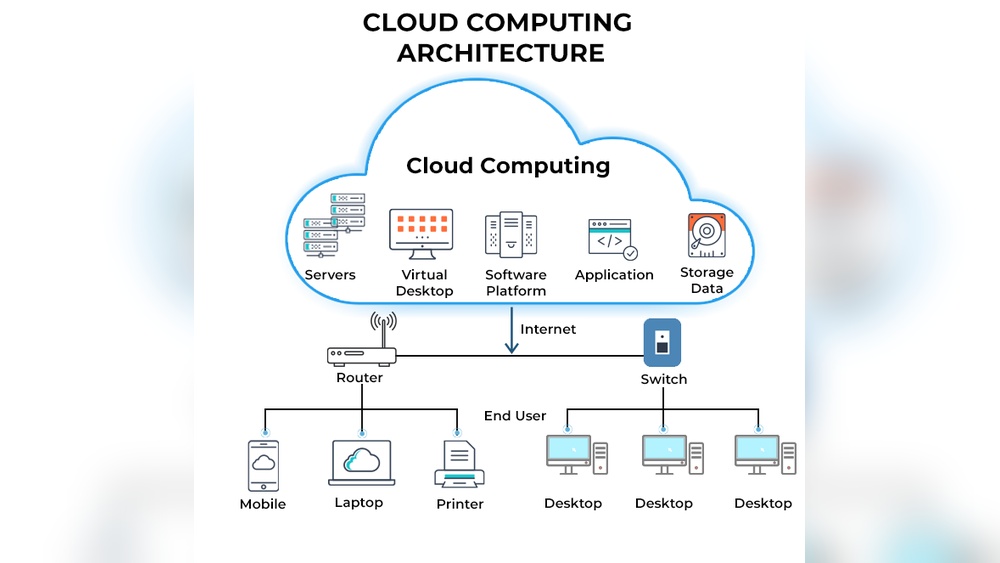

Cloud computing means using the internet to store and access data. It lets people use software and services without installing them on their devices.
Cloud computing has changed how businesses and individuals use technology. Instead of relying on local computers, users connect to powerful servers online. This approach offers flexibility, cost savings, and easy access from anywhere. As the internet grows, cloud services become more common and essential.
Understanding cloud computing helps grasp the future of technology. It explains why many apps, files, and services now live online. This guide will explore what cloud computing is and why it matters to everyone.
Cloud Computing Basics
Understanding the basics of cloud computing is essential if you want to make smarter decisions about technology for your business or personal use. Cloud computing lets you access computing resources like servers, storage, and software over the internet instead of relying on your own hardware. This approach saves you time, reduces costs, and offers flexibility you might not have expected.
Types Of Cloud Services
Cloud services come in different forms, each designed to meet specific needs. The three main types are:
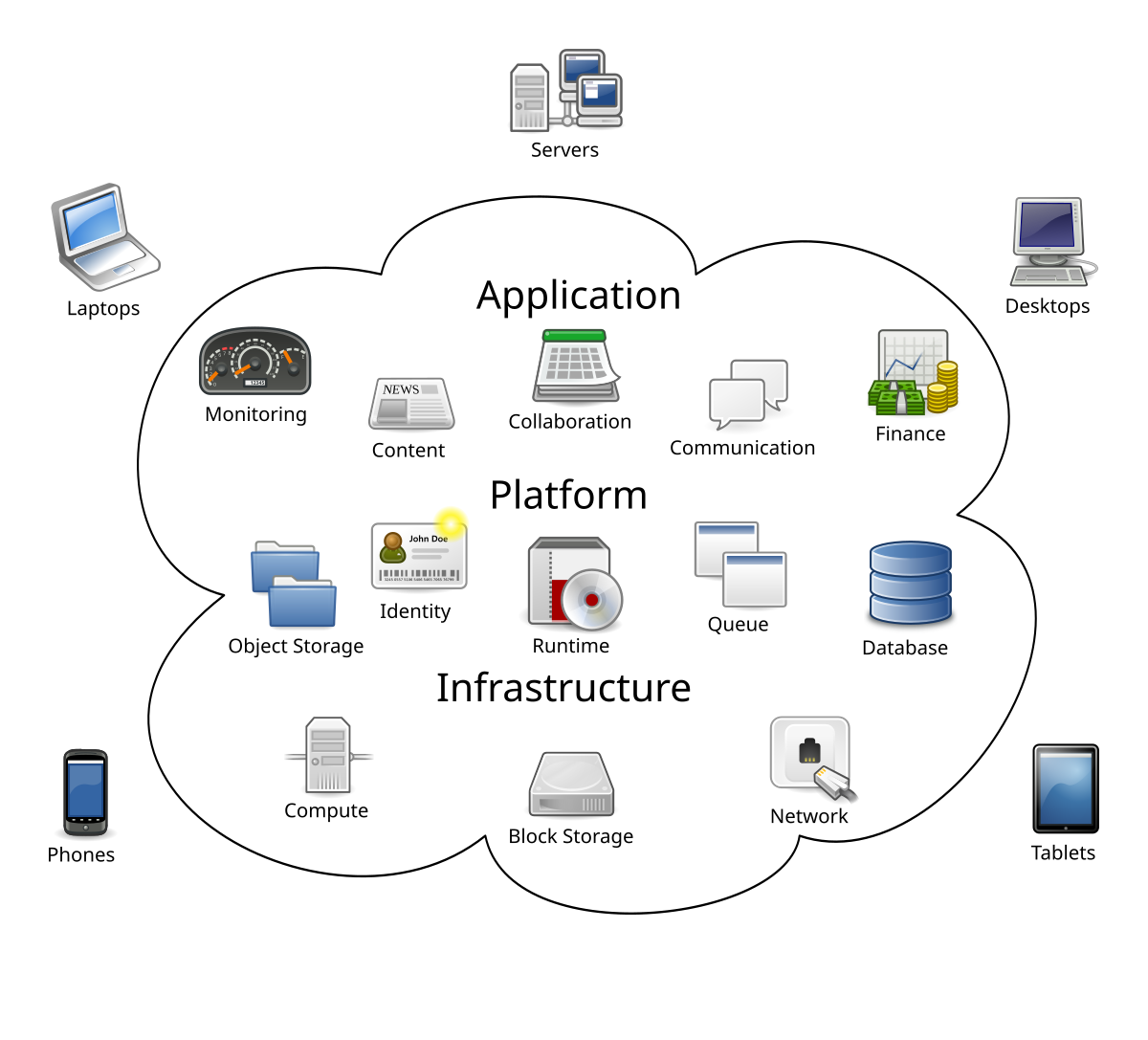
- Infrastructure as a Service (IaaS): You rent virtual machines and storage, handling your own software and apps. Think of it like renting a fully equipped workspace where you bring your own tools.
- Platform as a Service (PaaS): This gives you a ready-made environment for developing and deploying applications. You focus on coding while the provider manages the servers and software.
- Software as a Service (SaaS): You use software hosted online without worrying about installation or maintenance. Email services or online office suites are common examples.
Knowing which type fits your needs can save you frustration and money. Have you ever struggled with software updates or hardware failures? Cloud services can help you avoid those headaches.
Cloud Deployment Models
How you deploy cloud services affects your control, security, and cost. There are mainly three models:
- Public Cloud: Services are offered over the internet and shared among many users. It’s cost-effective but offers less control.
- Private Cloud: A cloud environment dedicated to a single organization, providing higher security and customization.
- Hybrid Cloud: Combines public and private clouds, giving you the flexibility to keep sensitive data private while using public resources for other tasks.
Choosing the right deployment model depends on your priorities. Are you more concerned about security, or is cost your main factor? Your choice can impact your cloud experience significantly.
:max_bytes(150000):strip_icc()/cloud-computing-4199287-f346729f8f574000a3058b9ad69e9a41.png)
Credit: www.investopedia.com
Key Cloud Technologies
Understanding key cloud technologies can help you make better decisions about using the cloud effectively. These technologies form the backbone of cloud services, enabling flexibility, scalability, and cost savings. Let’s look closely at two essential technologies that power most cloud environments today.
Virtualization And Containers
Virtualization lets you run multiple virtual machines on a single physical server. This means you can use your hardware more efficiently and quickly adjust resources as needed. I once managed a project where switching to virtualization cut our server costs by half, proving how impactful it can be.
Containers take this a step further by packaging applications and their dependencies into isolated units. Unlike virtual machines, containers share the host system’s operating system, making them lightweight and faster to start. If you want to deploy updates without downtime, containers offer a practical way to do it.
Serverless Computing
Serverless computing lets you run your code without worrying about managing servers. You only pay when your code runs, which can save money if your apps don’t need to run constantly. Have you ever faced a sudden spike in users? Serverless automatically scales up to handle the load, then scales down when demand drops.
This technology shifts your focus from infrastructure to writing code and delivering value. It’s ideal for event-driven applications like chatbots or real-time data processing. Thinking about your next project, could serverless help you launch faster and reduce maintenance headaches?
Benefits Of Cloud Adoption
Adopting cloud computing brings several clear benefits that can transform how your business operates. It offers new ways to grow, save money, and stay agile in a fast-moving market. Understanding these advantages helps you decide if moving to the cloud is the right step for your goals.
Scalability And Flexibility
Cloud services allow you to adjust your resources quickly based on demand. You don’t have to predict your needs months ahead or buy expensive hardware that might sit unused.
For example, an online store can easily handle traffic spikes during holiday sales by scaling up its cloud servers. After the rush, it scales down to save costs, something difficult to do with traditional setups.
Think about your own projects—how often do your needs change unexpectedly? Cloud computing lets you stay flexible, so you’re always ready for whatever comes next.
Cost Efficiency
Paying only for what you use is a major advantage of cloud adoption. Instead of large upfront expenses, you spread costs over time, which improves cash flow and budgeting.
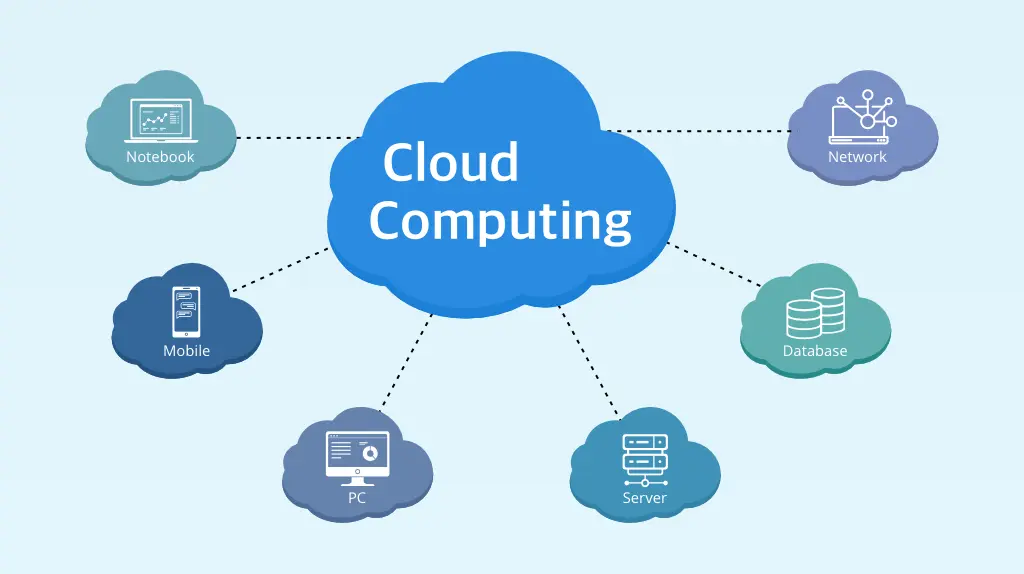
Many businesses find they cut costs on hardware maintenance, power, and IT staff by shifting to the cloud. I once worked with a startup that reduced its IT expenses by 30% within the first year simply by moving to cloud-based services.
Consider how much you currently spend on servers and software licenses—could cloud computing help you spend smarter without sacrificing performance?
Credit: platinumdatarecovery.com
Security In The Cloud
Security in the cloud remains one of the biggest concerns for anyone moving their data or applications online. You might wonder how safe your sensitive information really is when stored on someone else’s servers. Understanding the key security aspects can help you make smarter choices and keep your data protected.
Data Protection Strategies
Protecting your data starts with knowing where it lives and who can access it. Encryption is a powerful tool here—it scrambles your information so only authorized users can read it.
Many cloud providers offer built-in encryption, but you should also consider adding your own layer for extra safety. Regularly backing up your data ensures you won’t lose everything if something goes wrong.
Access control is another crucial strategy. Limit who can see or change your data by setting strong passwords and using multi-factor authentication. This way, even if someone steals your login details, they still can’t get in easily.
Compliance Challenges
Dealing with compliance can feel overwhelming, especially if your business handles sensitive information like customer data or health records. Different industries and countries have their own rules about storing and protecting data.
For example, healthcare companies must follow HIPAA regulations, while businesses in Europe need to comply with GDPR. You have to make sure your cloud provider meets these standards, or you risk facing legal trouble and fines.
Have you checked if your cloud service offers audit reports or certifications? These documents prove they follow security policies and can ease your compliance worries.
Cloud Computing Use Cases
Cloud computing offers a wide range of practical uses that can transform how your business or project operates. Understanding these use cases helps you see where cloud solutions fit in your daily work and long-term goals. Let’s look at some key areas where cloud computing makes a real difference.
Enterprise Applications
Many large companies rely on cloud computing to run their critical applications. It allows them to scale resources up or down quickly, depending on demand. This flexibility means you only pay for what you use, saving costs and improving efficiency.
Think about customer relationship management (CRM) systems or enterprise resource planning (ERP) software. Hosting these on the cloud ensures your teams can access data anytime, anywhere. This boosts collaboration and speeds up decision-making.
If you’ve ever struggled with slow software updates or limited storage, cloud solutions can help solve those problems. It’s easier to keep your applications up-to-date and backed up without heavy IT overhead. How could your business improve if your tools were always ready when you are?
Emerging Technologies Integration
Cloud computing plays a vital role in supporting new technologies like artificial intelligence (AI), Internet of Things (IoT), and big data analytics. These technologies often need massive computing power and storage that only the cloud can provide efficiently.
For example, you might use IoT devices to gather data in real time from your factory or office. Sending this data to the cloud allows you to analyze it immediately and act on insights faster. This can lead to better product quality or improved customer experiences.
AI services hosted on the cloud can also help automate tasks you do manually today. Imagine freeing up your time by letting AI handle routine customer inquiries or data sorting. What new possibilities would open up if technology handled your repetitive work reliably?
Future Trends In Cloud Tech
The future of cloud computing holds exciting possibilities that could change how you work, play, and connect online. As technology evolves, cloud services are becoming faster, smarter, and more flexible. Staying ahead means understanding which trends will shape your digital experience and business strategies.
Edge Computing
Edge computing moves data processing closer to where it happens — your devices or local servers — instead of relying solely on distant cloud centers. This reduces delays and improves speed, especially for real-time apps like gaming or smart home devices.
Imagine streaming a video game without lag because the data doesn’t have to travel far. You might already use edge computing without realizing it, like when your phone quickly recognizes your voice commands. As more devices connect to the internet, edge computing helps handle this growing data efficiently.
Ai And Machine Learning In Cloud
Cloud platforms are becoming home to powerful AI and machine learning tools that anyone can use, not just experts. This means you can add smart features like personalized recommendations or fraud detection to your apps without heavy upfront costs.
Think about how streaming services suggest shows based on what you watch. That’s AI working through the cloud. As these technologies improve, they’ll automate more tasks, help you make better decisions, and create new opportunities for innovation in your work or business.
Challenges Facing Cloud Growth
Cloud computing offers incredible benefits, but its growth isn’t without hurdles. As more businesses move their operations to the cloud, several challenges can slow down adoption and affect your experience. Understanding these obstacles helps you make smarter decisions and protect your data and investments.
Data Privacy Concerns
Data privacy is a major worry when using cloud services. You trust providers with sensitive information, but not all handle it with the same care. Breaches and unauthorized access can happen, putting your data at risk.
Think about how your personal or business data is stored and who can access it. Are you confident your cloud provider complies with privacy laws like GDPR or CCPA? If not, you could face legal troubles and lose customer trust.
You need to ask: How transparent is your cloud provider about data handling? Can you control where your data is stored? Understanding these details lets you choose services that safeguard your privacy effectively.
Vendor Lock-in Issues
Vendor lock-in means getting stuck with one cloud provider because switching is too costly or complex. This can limit your flexibility and increase expenses over time. Your business might miss out on better features or prices from other providers.
Imagine moving your entire system to a new cloud, but it requires reworking applications and retraining staff. These hidden costs make switching unattractive, even if the new provider offers clear benefits.
You should evaluate how easy it is to migrate your data and applications. Look for providers that support open standards and offer tools to avoid lock-in. This way, you keep control over your cloud strategy and avoid being trapped.
Credit: en.wikipedia.org
Choosing A Cloud Provider
Choosing the right cloud provider is a crucial step that can affect your project’s success. Your decision impacts costs, security, and how easily your team can scale resources. Understanding what to look for and knowing the popular options helps you make a confident choice.
Criteria For Selection
Start by evaluating your specific needs. Ask yourself: What workloads will I run? How much storage and computing power do I require? These questions guide you to providers that fit your scale and budget.
Security features should be at the top of your checklist. Check if the provider offers strong encryption, compliance certifications, and clear data privacy policies. Your data’s safety depends on these measures.
Consider the provider’s global network too. A wide range of data centers means better performance and reliability for your users across different locations. Downtime can cost you more than you think.
Look for flexible pricing models. Pay-as-you-go options help you avoid overpaying for unused resources. Also, see if they offer free trials or credits to test their services before committing.
Popular Cloud Platforms
Amazon Web Services (AWS) leads the market with a vast range of services and global coverage. Many businesses trust AWS for its reliability and extensive ecosystem.
Microsoft Azure is a great choice if you already use Microsoft products. Its seamless integration with tools like Office 365 and Windows Server can simplify your workflow.
Google Cloud Platform (GCP) stands out for its data analytics and machine learning tools. If your projects involve big data, GCP could give you an edge.
Don’t overlook smaller or specialized providers either. They might offer tailored solutions or better support for niche needs.
Which features matter most to your project’s future? Your answer will guide you straight to the provider that fits best.
Frequently Asked Questions
What Is Cloud Computing In Simple Terms?
Cloud computing delivers computing services like storage, databases, and software over the internet. It allows users to access resources remotely without owning physical hardware. This model provides flexibility, scalability, and cost savings for individuals and businesses.
How Does Cloud Computing Work?
Cloud computing works by connecting users to remote servers hosted on the internet. These servers store data and run applications on demand. Users access services via web browsers or apps, eliminating the need for local infrastructure and enabling efficient resource management.
What Are The Main Types Of Cloud Computing?
The main types include public, private, and hybrid clouds. Public clouds are shared and managed by providers. Private clouds are dedicated to one organization. Hybrid clouds combine both, offering flexibility and security based on business needs.
What Are The Benefits Of Cloud Computing?
Cloud computing offers cost efficiency, scalability, and easy access to data. It improves collaboration, enhances disaster recovery, and supports remote work. These advantages make it ideal for businesses aiming to innovate and reduce IT overhead.
Conclusion
Cloud computing offers flexible and cost-effective ways to use technology. It helps people and businesses store data and run programs online. This technology grows fast and changes how we work and connect. Many devices can access cloud services anytime and anywhere.
Understanding cloud computing is useful for everyone today. It simplifies tasks and saves time. Try exploring cloud options to see how they fit your needs. The cloud is here to stay and will keep improving our digital world.