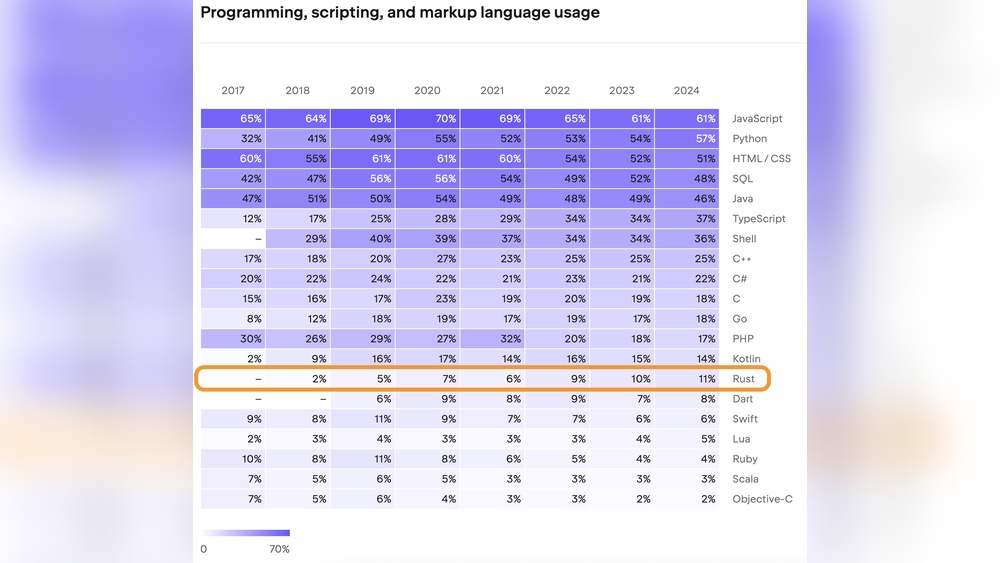

Are you ready to master Rust in 2025? Whether you’re starting from scratch or want to sharpen your skills, this guide is made just for you.
Rust is growing fast, and learning it now can open doors to exciting projects and better job opportunities. You’ll discover simple, clear steps to get comfortable with Rust without feeling overwhelmed. Stick with me, and by the end, you’ll know exactly how to start coding confidently and make Rust work for you.
Let’s dive in and unlock your potential with Rust!
Why Choose Rust
Rust stands out as a strong choice for programmers in 2025. It offers many benefits for those who want fast and safe software. Many developers choose Rust for its unique mix of power and ease. Understanding why Rust is popular can help you decide if it fits your needs.
Performance And Safety
Rust delivers excellent speed like low-level languages. It runs code fast without extra checks slowing it down. Safety is a top priority. Rust stops bugs before the program runs. It prevents crashes caused by memory errors. This balance makes Rust perfect for critical projects.
Growing Community
Rust’s user base keeps expanding quickly. Many developers share code and help beginners. Online forums and tutorials are easy to find. This support makes learning Rust less hard. Being part of a vibrant community encourages learning and problem-solving.
Real-world Applications
Big companies use Rust in real projects. It works well for web servers, games, and embedded devices. Rust is also popular for blockchain and system tools. Using Rust skills can open doors to many job types. Practical use proves Rust’s value in today’s tech world.

Credit: blog.openreplay.com
Setting Up Rust
Setting up Rust is the first step to writing code in this powerful language. The process is straightforward and does not take much time. You need to install the Rust toolchain, configure your code editor, and explore online tools to practice.
Installing Rust Toolchain
Start by downloading Rust from the official website. The Rust toolchain includes the compiler and package manager. Use the command curl --proto '=https' --tlsv1.2 -sSf https://sh.rustup.rs | sh on Linux or macOS. Windows users can install Rust using the official installer. After installation, check the version with rustc --version. This confirms Rust is ready to use.
Configuring Ides
Choose a code editor that supports Rust. Visual Studio Code and IntelliJ IDEA are popular choices. Install the Rust extension or plugin for your editor. These tools provide features like syntax highlighting and code completion. Configure the settings for better Rust support. This helps you write code faster and with fewer errors.
Using Rust Playground
Rust Playground is an online tool to write and run Rust code instantly. No setup needed. Visit play.rust-lang.org and start coding. It is great for trying small code snippets and sharing them. Use it to practice before setting up your local environment.
Core Concepts
Understanding the core concepts of Rust is key to learning the language well. These concepts form the base for writing safe and fast programs. Focus on these ideas to build a solid foundation.
Variables And Mutability
In Rust, variables are immutable by default. This means you cannot change their value after assigning it. To allow changes, you must declare the variable as mutable using mut. This approach helps avoid bugs and makes your code safer. Learning how to manage variables and their mutability is essential for Rust programming.
Ownership And Borrowing
Ownership is a unique concept in Rust. Each value has a single owner, and when the owner goes out of scope, the value is dropped. Borrowing lets you use a value without taking ownership. It comes in two types: mutable and immutable. These rules prevent memory errors and data races. Grasping ownership and borrowing makes your code efficient and safe.
Data Types And Pattern Matching
Rust offers many data types like integers, floats, booleans, and more. Understanding these types helps you write clear code. Pattern matching lets you compare a value against patterns. It is useful for handling different data forms cleanly. Practice using pattern matching to control your program flow better.

Credit: blog.akshaykhale.com
Control Flow And Functions
Control flow and functions form the core of Rust programming. They guide how the program runs and how tasks are organized. Learning these basics helps you write clear and efficient Rust code.
Control flow lets your program make decisions and repeat tasks. Functions group code into reusable blocks. Together, they build strong, readable programs.
Conditional Statements
Conditional statements check if something is true or false. The most common is the if statement. It runs code only when a condition holds.
You can add else to run code if the condition is false. For many choices, use match. It compares a value to many patterns. This keeps code neat and clear.
Loops And Iterators
Loops repeat code many times. Rust has three main loops: loop, while, and for. Use loop for endless repetition.
while repeats while a condition stays true. for runs over items in a list or range. Iterators let you handle collections easily. They make processing data smooth and fast.
Defining And Calling Functions
Functions hold code you want to reuse. Define a function with fn and a name. Inside, write the steps the function performs.
Functions can take inputs called parameters. They may return a value too. Call a function by writing its name and giving values if needed.
Using functions breaks programs into small, easy parts. It improves code reading and fixing.
Working With Collections
Rust handles collections with strong safety and speed. Collections store multiple values in one place. They are essential for many programs. Learning to use them helps write clear and efficient code. Rust offers different types of collections for various needs.
Vectors And Arrays
Vectors are growable arrays. You can add or remove elements easily. Arrays have fixed size. Use arrays when you know the number of elements.
Vectors store data on the heap. Arrays store data on the stack. This affects performance and flexibility. Use vectors for dynamic data. Use arrays for small, fixed data sets.
Hashmaps And Strings
HashMaps store key-value pairs. Keys must be unique. They help find values fast. Use HashMaps for fast lookups and data mapping.
Strings store text data. Rust has two main string types: String and &str. String is growable and owned. &str is a string slice, borrowed from somewhere else.
Slices And Iterators
Slices are views into arrays or vectors. They let you access parts without copying. Use slices to work with subsets of data safely.
Iterators process collections one element at a time. They help write loops cleanly. Iterators work with many collection types. They improve code readability and performance.
Error Handling
Error handling is a key skill in Rust programming. It helps your code deal with problems safely. Rust uses special tools to manage errors without crashing your program. Learning error handling keeps your code strong and reliable.
Using Result And Option
Rust uses two main types for errors: Result and Option. Result shows success or failure. Option shows if a value exists or not. Use Result to handle expected errors. Use Option to handle missing values. Both types force you to check for errors.
Panic And Unwrap
Panic stops the program when something goes wrong. It is like an emergency stop. Use panic only for serious bugs. Unwrap gets the value inside Option or Result. It causes panic if there is no value. Use unwrap carefully to avoid crashes.
Custom Error Types
Create custom error types to explain errors clearly. Custom errors help other developers understand your code. Use enums to list different error cases. Implement the Error trait for better error messages. Custom errors make your code easier to fix and maintain.
Modules And Packages
Modules and packages organize Rust code. They help you split code into smaller parts. This makes your code easier to read and maintain. Modules group related functions and types. Packages, or crates, share code with others or reuse it in your projects. Understanding these concepts is key to writing clean Rust programs.
Creating Modules
Create modules to divide your code into sections. Use the mod keyword to define a module. Put code inside curly braces or in separate files. Modules can contain functions, structs, and other modules. This structure helps keep your code clear and organized.
Using Crates
Crates are Rust’s packages. They hold code libraries or programs. Use crates to share your code or use others’ code. Import crates with the extern crate statement or use keyword. Crates save time by providing pre-written code for common tasks.
Managing Dependencies
Dependencies are crates your project needs to work. Use the Cargo.toml file to list them. Cargo downloads and builds these crates automatically. Keep dependencies updated for better security and features. Manage versions carefully to avoid conflicts in your project.

Credit: metana.io
Concurrency Basics
Concurrency is a key concept in Rust programming. It allows your programs to do many things at once. This can make your code faster and more efficient. Understanding concurrency basics helps you write better Rust code.
Rust offers safe and powerful tools for concurrent programming. These tools help avoid common bugs like data races. Let’s explore the main parts of concurrency in Rust.
Threads In Rust
Threads are separate paths of execution. Rust lets you create threads easily using the standard library. Each thread runs independently and can perform tasks simultaneously.
Creating threads in Rust is safe because the compiler checks for errors. This reduces bugs that happen in other languages. Threads are useful for running heavy tasks without blocking your program.
Message Passing
Message passing means threads communicate by sending data. Rust uses channels for this. Channels let one thread send messages to another safely.
This method avoids direct access to shared data. It reduces the chance of conflicts and bugs. Message passing works well for tasks that need coordination.
Shared State
Shared state means multiple threads access the same data. Rust controls this access strictly. It uses types like Mutex and RwLock to manage shared state.
These tools make sure only one thread changes the data at a time. This prevents data races and keeps your program stable. Shared state is useful but needs careful handling.
Building Projects
Building projects is a great way to learn Rust in 2025. It helps you practice coding and understand Rust’s unique features. Projects make learning active and real. They show how Rust works in practical situations. You get better at writing clean and safe code.
Start with small projects. Then try bigger ones. Each project teaches new skills. You also learn to organize your code well. Project building also prepares you for teamwork and real software development.
Project Structure
Good project structure keeps code clear and easy to manage. Rust projects follow a standard layout. Use folders like src for source files and tests for test files. Keep related files together. This helps find code quickly and fix bugs faster.
Organize your code into modules. Modules divide code into parts. Each part handles a specific task. This makes code clean and reusable. A clear structure helps others understand your code easily.
Using Cargo Effectively
Cargo is Rust’s build tool and package manager. It handles compiling, running, and managing dependencies. Learn basic Cargo commands like cargo build, cargo run, and cargo test. These commands save time and reduce errors.
Cargo also manages project versions and libraries. Add external libraries with cargo add. This lets you use ready-made tools in your projects. Cargo makes your project setup simple and efficient.
Testing And Debugging
Testing ensures your code works correctly. Rust has built-in support for tests. Write tests inside your project to check functions. Use [test] to mark test functions. Run tests with cargo test. This finds mistakes early.
Debugging helps fix errors. Use Rust’s error messages to understand problems. Tools like println! help track variables and program flow. Debugging is a key skill for any coder. It makes your projects reliable and strong.
Learning Resources
Learning Rust in 2025 is easier with the right resources. A mix of books, courses, and community support helps beginners and experts. Choosing the right tools saves time and boosts progress.
Books And Tutorials
Books provide a deep understanding of Rust’s concepts. Titles like “The Rust Programming Language” remain popular. Tutorials offer step-by-step guides for building projects. They help learners apply knowledge quickly. Reading and practicing together improves skills fast.
Online Courses
Online courses offer structured learning paths. Videos and exercises make complex topics simple. Many courses update regularly to match Rust’s changes. Interactive lessons keep learners engaged. Courses suit people who prefer guided learning.
Community And Forums
Rust has a strong, helpful community. Forums like the Rust Users Forum and Reddit offer advice and support. Joining discussions helps solve problems quickly. Community members share tips and code examples. Connecting with others makes learning Rust fun and less lonely.
Frequently Asked Questions
What Are The Best Resources To Learn Rust In 2025?
The best resources for learning Rust in 2025 include the official Rust book, online tutorials, and community forums. Interactive coding platforms and video courses also offer practical experience. Staying updated with Rust’s evolving documentation ensures you learn the latest features efficiently.
How Long Does It Take To Learn Rust Programming?
Learning Rust typically takes 3 to 6 months with consistent practice. The timeframe depends on your programming background and dedication. Beginners may take longer, while experienced developers can grasp Rust’s concepts faster. Regular coding and project building speed up mastery.
Is Rust Suitable For Beginners In Programming?
Rust is beginner-friendly but has a learning curve due to its unique ownership model. It encourages safe coding and memory management. Beginners with patience and good resources can learn Rust effectively. It’s ideal for those wanting strong, reliable system programming skills.
What Projects Help Practice Rust In 2025?
Building CLI tools, web servers, and game engines are great Rust projects. Contributing to open-source Rust projects also sharpens skills. These projects offer hands-on experience with Rust’s concurrency and safety features, making learning practical and engaging.
Conclusion
Learning Rust in 2025 is a smart choice for programmers. Start with the basics and practice often. Use online tutorials and coding exercises daily. Join Rust communities to ask questions and share ideas. Build small projects to improve your skills step by step.
Keep your learning simple and steady. Remember, patience helps you grow as a coder. Rust’s clear syntax makes it easier to learn. Keep coding, stay curious, and enjoy the process. Your effort will pay off in the long run.