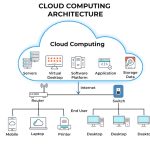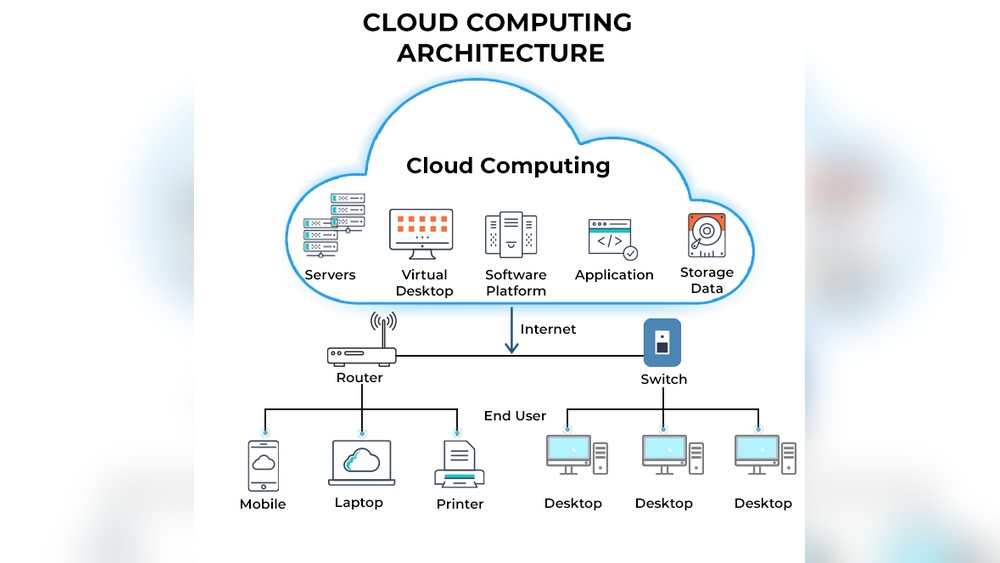

Cloud computing means storing and accessing data through the internet instead of a local computer. It lets you use powerful servers remotely to run applications, save files, and manage information easily.
This matters because over 94 percent of businesses now rely on cloud services for daily operations. Understanding how it works helps you make smarter choices about data security, cost, and performance. You can gain flexibility while reducing hardware needs and maintenance costs.
In this guide, you will learn how cloud computing functions, its main types, and the benefits it brings to your personal and professional life. By the end, you will know how to use cloud technology confidently and efficiently.
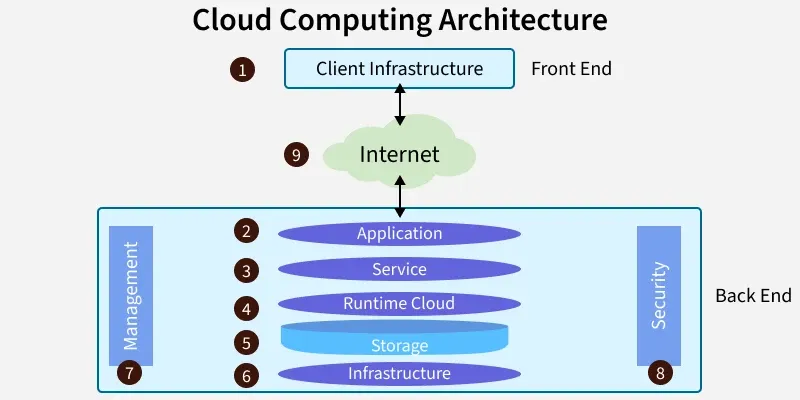
Credit: www.geeksforgeeks.org
What Is Cloud Computing: Unlocking The Future Of Technology
Cloud computing is reshaping how businesses and individuals use technology. It provides instant access to computing resources such as servers, storage, and applications through the internet. This flexibility allows organizations to scale efficiently, reduce costs, and enhance productivity while focusing on innovation rather than infrastructure management.
Defining The Concept Of Cloud Computing
Cloud computing refers to delivering computing services over the internet instead of using local hardware. It operates through data centers spread across multiple geographic locations, ensuring reliability and speed. Providers like AWS, Microsoft Azure, and Google Cloud offer various service models to meet different needs.
- Infrastructure as a Service (IaaS): Offers virtualized computing resources such as servers and storage.
- Platform as a Service (PaaS): Provides a framework for developers to build and deploy applications.
- Software as a Service (SaaS): Delivers ready-to-use software through web browsers.
- Deployment Models: Public, private, hybrid, and multi-cloud setups support diverse requirements.
Tracing The Evolution From Traditional It To Cloud Systems
Traditional IT relied on on-premises servers and physical storage, often limiting scalability and flexibility. Over the years, advances in virtualization and broadband connectivity paved the way for cloud systems. By 2010, cloud computing became mainstream with major providers introducing affordable, on-demand services.
| Era | Technology Focus | Impact |
|---|---|---|
| 1990s | Dedicated servers | High maintenance cost |
| 2000s | Virtualization | Improved resource efficiency |
| 2010s | Public cloud adoption | Global scalability and automation |
| 2020s | Edge and hybrid cloud | Real-time data processing |
Understanding How Cloud Computing Powers Modern Innovation
Cloud technology drives progress in fields like artificial intelligence, data analytics, and remote collaboration. Organizations use cloud platforms to process large datasets, run machine learning models, and manage global operations seamlessly. For instance, healthcare systems analyze millions of patient records securely in the cloud.
- AI and Machine Learning: Cloud GPUs enable complex model training faster and cheaper.
- Data Storage: Scalable systems like Amazon S3 store petabytes of information safely.
- Collaboration Tools: Services such as Google Workspace support real-time global teamwork.
- IoT Integration: Smart devices connect through cloud APIs for automated data exchange.
From startups to large enterprises, the cloud continues to shape how technology evolves. Its adaptability and power make it essential for digital transformation and sustainable growth in every industry.
Core Components Of Cloud Computing
Cloud computing relies on several core components that work together to deliver scalable and efficient digital services. These components define how resources are created, managed, and delivered across networks. Understanding them helps organizations choose the right model for their workload and security needs.
Infrastructure As A Service (iaas)
I have worked extensively with IaaS platforms that provide virtualized computing resources. They include servers, storage, and networking managed through the cloud. Businesses use IaaS to avoid costly hardware investments and maintain flexibility in scaling operations.
- Virtual Machines: Users deploy applications on remote servers without owning physical machines.
- Storage Solutions: Providers offer secure data storage with high redundancy and quick recovery.
- Networking Features: Cloud networks enable fast data transfer and secure communication channels.
- Example: Amazon EC2 and Google Compute Engine are widely used IaaS platforms.
Platform As A Service (paas)
PaaS simplifies application development by offering a ready-to-use environment. I often use PaaS for projects that require rapid deployment and minimal infrastructure management. It provides essential tools such as operating systems, databases, and frameworks.
- Development Tools: Preconfigured environments speed up coding and testing cycles.
- Scalability: Applications scale automatically based on traffic demands.
- Integration: Built-in APIs connect easily with third-party services.
- Example: Microsoft Azure App Service and Heroku are popular PaaS platforms.
Software As A Service (saas)
SaaS delivers software applications over the internet without installation or maintenance. I rely on SaaS products daily for collaboration, analytics, and customer management. These services are subscription-based and update automatically.
| Feature | Description | Example |
|---|---|---|
| Accessibility | Users access applications through a web browser. | Google Workspace |
| Cost Efficiency | No upfront hardware or software investment. | Salesforce CRM |
| Maintenance | Providers manage updates and security patches. | Adobe Creative Cloud |
Deployment Models: Public, Private, Hybrid, And Multi-cloud
Deployment models define how cloud resources are shared and secured. I help clients choose models based on their compliance, cost, and operational goals. Each model offers unique benefits and challenges.
- Public Cloud: Resources are shared across multiple users through providers like AWS and Azure.
- Private Cloud: Dedicated infrastructure offers higher control and security for sensitive data.
- Hybrid Cloud: Combines public and private systems for flexible workloads and cost management.
- Multi-cloud: Uses several providers to avoid vendor lock-in and improve reliability.
5 Key Benefits Driving Cloud Adoption
Cloud computing continues to reshape how organizations manage technology resources. Its wide adoption is driven by clear business advantages, from cost savings to improved agility. Based on years of working with enterprise cloud migration projects, I have seen five key benefits consistently stand out among successful implementations.
Cost Efficiency And Scalability Advantages
Cost control remains the strongest reason for cloud adoption. Traditional data centers require heavy upfront investments in hardware and maintenance. With cloud services, companies pay only for what they use. This shift from capital expenses to operational expenses allows flexible budgeting and easier forecasting.
- Pay-as-you-go model: Reduces unnecessary hardware spending and improves resource allocation.
- Elastic scalability: Systems can scale up or down instantly based on demand.
- Automated performance optimization: Cloud platforms balance workloads efficiently during peak hours.
- Example: A retail firm scaled resources by 250% during holiday sales without new hardware purchases.
Enhanced Flexibility And Remote Accessibility
Cloud computing enables teams to access applications and data anywhere with an internet connection. This flexibility improves collaboration and productivity, especially for distributed teams. I have observed remote engineering groups using cloud-based tools to maintain seamless workflow across continents.
Key technologies supporting this flexibility include virtual desktops, shared storage, and real-time communication apps. These solutions allow employees to work securely from any device.
| Cloud Service | Main Function | Typical Use Case |
|---|---|---|
| Virtual Desktop Infrastructure | Remote access to managed desktops | Global IT teams |
| Cloud Storage | Centralized data access | Document sharing and backup |
| Collaboration Tools | Real-time communication | Project management and meetings |
Improved Data Security And Compliance Capabilities
Security concerns often arise during cloud transitions, yet most providers exceed on-premise protection standards. Cloud environments offer advanced encryption, multi-factor authentication, and continuous monitoring. I have seen financial clients achieve compliance faster after migrating to certified cloud platforms.
- Data encryption: Protects sensitive information both in transit and at rest.
- Automated backups: Reduces risk of data loss due to human error.
- Compliance certifications: Providers maintain standards like ISO 27001 and GDPR.
- 24/7 monitoring: Detects unusual activity before damage occurs.
Faster Innovation And Reduced Time To Market
Cloud computing accelerates development and deployment cycles. Developers can test new applications using preconfigured environments without waiting for hardware setup. This speed directly impacts business competitiveness.
For instance, a software startup I consulted reduced product launch time from six months to eight weeks using cloud-based DevOps pipelines. Continuous integration and automated testing helped the team deliver updates quickly and safely.
| Process | Traditional Timeline | Cloud Timeline |
|---|---|---|
| Environment Setup | 2 weeks | 2 hours |
| Application Testing | 10 days | 3 days |
| Deployment | 1 week | 1 day |
Environmental Sustainability Through Optimized Resource Usage
Cloud data centers are designed for efficient power consumption and lower carbon footprint. Shared infrastructure reduces the total number of physical servers needed worldwide. I often advise organizations to measure their carbon savings after cloud migration.
- Energy-efficient hardware: Providers use advanced cooling and renewable energy sources.
- Dynamic resource allocation: Minimizes idle capacity and energy waste.
- Centralized operations: Reduces transportation and on-site maintenance emissions.
- Real-world impact: One global enterprise cut energy use by 35% through cloud adoption.
Real-world Applications Transforming Industries
Cloud computing is changing how industries operate and deliver value. It allows faster data access, flexible scaling, and smart decision-making. Businesses use cloud platforms to improve workflows and meet customer needs in real time.
Cloud Computing In Healthcare And Telemedicine
Hospitals now depend on cloud-based systems to store and analyze patient data. I have seen clinics use cloud analytics to track health trends across cities. Doctors share medical images instantly through secure cloud servers, reducing wait times for diagnosis.
- Remote consultations: Patients connect with doctors through encrypted cloud platforms.
- Data accuracy: Cloud tools process large sets of medical records in seconds.
- Scalable storage: Health facilities expand data capacity without installing new hardware.
- AI integration: Predictive models help identify disease risks using cloud data.
Smart Manufacturing Powered By Cloud Analytics
Factories use cloud computing to monitor equipment and production efficiency. I have observed automated machines sending sensor data to cloud dashboards every few seconds. Engineers track real-time performance metrics and adjust operations on the fly.
| Application | Cloud Function | Impact |
|---|---|---|
| Predictive maintenance | Analyzes sensor data for wear and tear | Reduces downtime by up to 30% |
| Production analytics | Tracks output levels and resource use | Improves efficiency by 25% |
| Supply chain visibility | Shares data across global factories | Speeds delivery by 15% |
Financial Services And Secure Cloud Transactions
Financial institutions rely on cloud security to protect sensitive data. I have reviewed systems where encryption standards reach 256-bit protection levels. Cloud platforms now handle millions of transactions daily without performance loss.
- Fraud detection: AI tools scan cloud data for unusual patterns instantly.
- Secure backups: Encrypted databases prevent unauthorized access during recovery.
- Cost efficiency: Banks reduce IT infrastructure spending by 40% using cloud models.
- Global compliance: Cloud providers meet financial data privacy laws in multiple regions.
Education And E-learning Through Cloud-based Platforms
Schools and universities use cloud learning tools to reach students anywhere. I have seen teachers upload video lessons to cloud servers, accessible 24/7. Learners join live sessions and share assignments through cloud collaboration apps.
| Feature | Cloud Benefit | Example |
|---|---|---|
| Virtual classrooms | Hosts interactive lessons for global students | Platforms like Google Classroom |
| Resource sharing | Stores documents and videos securely | Access via Microsoft OneDrive |
| Performance tracking | Analyzes student progress automatically | Data reports for teachers and parents |
Comparing Cloud Computing With Traditional It
Comparing Cloud Computing with traditional IT helps businesses understand how technology delivery has evolved. I have managed both systems, and the shift toward cloud platforms is clear in speed, flexibility, and cost control. The following sections break down the practical contrasts that influence how organizations plan their IT strategies today.
Differences In Architecture And Maintenance
Traditional IT runs on physical servers located on-site. Cloud systems operate through virtualized resources hosted in remote data centers. I have seen clients move from racks of hardware to scalable virtual machines within weeks. The architecture difference changes how teams handle maintenance and upgrades.
- Infrastructure setup: Traditional IT needs large upfront hardware purchases, while cloud uses pay-as-you-go virtual resources.
- Maintenance model: On-premise systems demand manual updates; cloud vendors automate patches and backups.
- Deployment speed: Cloud services can launch new environments in minutes; traditional setups may take days.
- Security management: Cloud providers apply consistent global security policies, unlike fragmented local systems.
Operational Efficiency And Cost Implications
I have monitored operational budgets in both models. Cloud computing consistently reduces overhead by removing hardware management and lowering energy use. It shifts expenses from capital to operational, enabling better forecasting. Efficiency gains often appear within the first quarter after migration.
| Factor | Traditional IT | Cloud Computing |
|---|---|---|
| Cost Type | Capital expenditure (CapEx) | Operational expenditure (OpEx) |
| Energy Use | High due to local servers | Optimized through shared resources |
| IT Staffing Needs | Large in-house team | Smaller, cloud-focused team |
| Upgrade Costs | Frequent hardware replacements | Included in subscription fees |
Performance, Reliability, And Scalability Contrasts
Performance and reliability define how systems handle workload changes. Cloud computing offers dynamic resource scaling, which traditional IT cannot match easily. I have witnessed cloud platforms maintain uptime above 99.9% through distributed architecture. The difference affects real-time applications and data-heavy operations.
- Scalability: Cloud environments adjust resources instantly; physical servers require manual expansion.
- Reliability: Multiple data centers ensure continuous service; local setups risk downtime during failures.
- Performance monitoring: Cloud tools provide live analytics; traditional systems rely on manual checks.
- Disaster recovery: Cloud backups restore data within minutes; physical recovery may take days.
Long-term Business Impact And Adaptability
From my experience, cloud computing supports fast adaptation to market changes. It lets companies test new services without major investment. Traditional IT often limits experimentation because of fixed capacity. The long-term impact includes better agility and smoother digital transformation.
- Business growth: Cloud models scale with demand, supporting rapid expansion.
- Innovation pace: Developers deploy updates faster using automated pipelines.
- Sustainability: Shared cloud infrastructure reduces carbon footprint and hardware waste.
- Global reach: Cloud services enable remote teams to access systems securely worldwide.
:max_bytes(150000):strip_icc()/cloud-computing-4199287-f346729f8f574000a3058b9ad69e9a41.png)
Credit: www.investopedia.com
Emerging Trends And Future Innovations
The world of cloud computing continues to evolve at a rapid pace. New technologies are reshaping how data is stored, processed, and accessed across industries. These emerging trends are driving smarter, faster, and more efficient systems that support modern digital demands.
Integration Of Ai And Machine Learning In Cloud Platforms
Cloud providers now embed AI and machine learning directly into their services. These tools automate complex tasks such as predictive analytics and resource optimization. I have seen companies reduce server downtime by 40% using AI-driven monitoring systems. Machine learning also improves data security by detecting unusual access patterns in real time.
- AI-enhanced automation: Speeds up deployment and scaling of applications.
- Data-driven insights: Helps businesses predict customer behavior and market trends.
- Smart resource allocation: Optimizes compute power based on workload demands.
- Enhanced cybersecurity: Identifies and responds to threats faster than manual systems.
Edge Computing And Real-time Data Processing
Edge computing brings data processing closer to users and devices. It reduces latency and boosts performance for tasks requiring instant feedback. I have observed factories using edge systems to analyze sensor data within milliseconds, improving safety and productivity.
| Feature | Benefit | Example Use Case |
|---|---|---|
| Low latency | Faster data responses | Autonomous vehicles |
| Local processing | Reduced cloud bandwidth | Smart manufacturing |
| Real-time analytics | Instant decision-making | Healthcare monitoring |
Serverless Architecture And Microservices Evolution
Serverless computing and microservices are changing how developers build applications. These models remove the need for managing servers directly. In my projects, serverless setups cut maintenance costs by up to 60%. Microservices allow faster updates and independent scaling of components.
- Event-driven execution: Code runs only when triggered, saving resources.
- Independent scaling: Each microservice scales based on traffic or demand.
- Rapid deployment: Teams release updates without full system downtime.
- Cost efficiency: Pay only for the exact compute time used.
Quantum Computing And Its Potential Cloud Synergy
Quantum computing promises massive leaps in processing speed and data complexity. Cloud platforms are preparing to host quantum systems accessible through virtual interfaces. I have reviewed prototypes that solve encryption algorithms a thousand times faster than classical methods.
| Aspect | Current Status | Future Potential |
|---|---|---|
| Computing power | Limited to research labs | Available via cloud APIs |
| Use cases | Cryptography, optimization | Drug discovery, financial modeling |
| Integration speed | Experimental phase | Expected cloud integration by 2030 |
Best Practices For Secure And Efficient Cloud Use
Using cloud technology safely and efficiently requires clear strategies and strong security. Businesses depend on the cloud for flexibility and cost savings, but poor management can lead to data loss and performance issues. Following tested best practices helps maintain trust, protect sensitive information, and ensure systems run smoothly under any workload.
Implementing Robust Data Encryption And Access Control
Data protection starts with strong encryption and controlled access. I always recommend encrypting files both in transit and at rest using AES-256 or similar advanced protocols. Multi-factor authentication (MFA) adds a vital layer of defense against unauthorized entry. Role-based access ensures employees only reach what they need, reducing exposure risks.
- Encryption standards: Use AES-256 for stored data and TLS 1.3 for data in motion.
- MFA implementation: Require two or more verification methods for every login.
- Role-based access: Assign permissions based on job functions, not user requests.
- Regular audits: Review access logs every 30 days to detect anomalies early.
Monitoring And Optimizing Cloud Performance
Cloud performance affects productivity and user experience. I use real-time monitoring tools to track CPU usage, memory load, and network latency. Automated alerts help fix problems before users notice delays. Continuous performance reviews keep systems efficient and cost-effective.
| Metric | Recommended Range | Action Trigger |
|---|---|---|
| CPU Utilization | 40% – 70% | Scale up if above 80% |
| Memory Usage | 50% – 75% | Optimize applications if above 80% |
| Network Latency | Under 100 ms | Check routing if above 120 ms |
Ensuring Compliance With Global Security Standards
Compliance builds customer trust and prevents costly penalties. Every cloud setup must align with international frameworks such as GDPR, ISO 27001, and SOC 2. I always verify that data centers follow these standards before deployment. Documentation and audit trails confirm accountability at every stage.
- GDPR alignment: Protect user privacy and allow easy data deletion requests.
- ISO 27001 certification: Verify provider security processes meet global benchmarks.
- SOC 2 monitoring: Review operational controls for confidentiality and integrity.
- Regular compliance checks: Schedule reviews every quarter to ensure ongoing conformity.
Building A Cloud Strategy Aligned With Business Goals
A successful cloud plan connects directly to company objectives. I start by mapping workloads to business priorities, ensuring scalability matches demand. Cost management tools help track spending per department. Each decision must support growth, agility, and data security without waste.
- Goal mapping: Define how each cloud service supports business outcomes.
- Scalability planning: Choose auto-scaling features for seasonal or project-based needs.
- Cost tracking: Use dashboards to monitor monthly resource consumption.
- Risk assessment: Identify potential downtime impacts and prepare recovery plans.
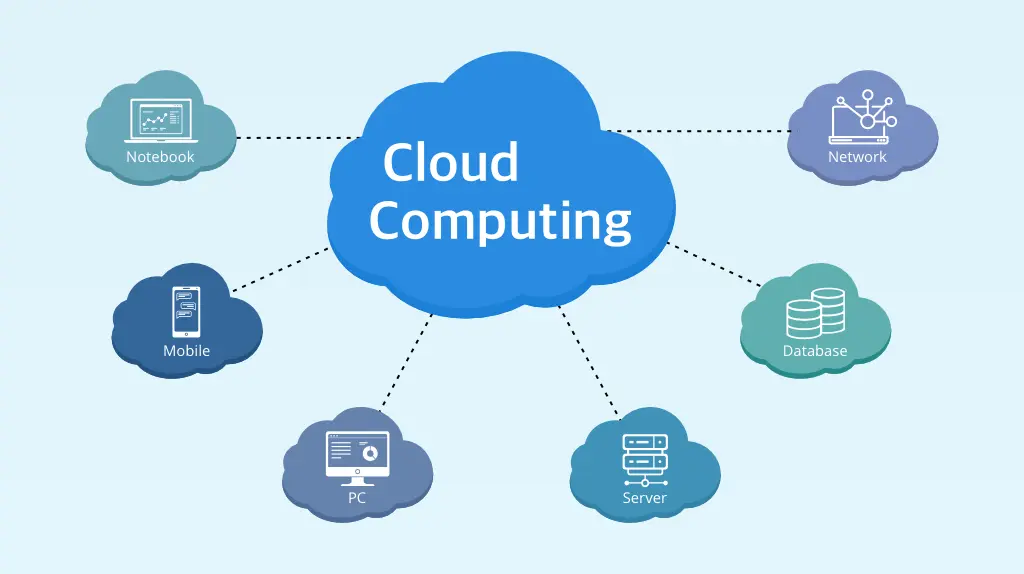
Credit: platinumdatarecovery.com
Frequently Asked Questions
What Is Cloud Computing In Simple Terms?
Cloud computing is the delivery of computing services like storage, databases, and networking over the internet. It allows businesses and individuals to access technology resources on demand without managing physical servers. This flexibility helps reduce costs and improve scalability.
How Does Cloud Computing Work?
Cloud computing works by hosting data and applications on remote servers managed by cloud providers. Users connect through the internet to access these resources. The provider handles maintenance, updates, and security, enabling users to focus on their core tasks efficiently.
What Are The Main Types Of Cloud Computing?
Cloud computing is divided into three types: public, private, and hybrid clouds. Public clouds offer services to multiple users, private clouds serve one organization, and hybrid clouds combine both. Each type provides different levels of control, security, and scalability.
What Are The Benefits Of Cloud Computing?
Cloud computing offers flexibility, cost efficiency, and easy scalability. It eliminates the need for expensive hardware and maintenance. Businesses can quickly adapt to changing demands and access data from anywhere, enhancing productivity and collaboration.
Conclusion
Cloud computing keeps growing and changing how people use technology. It makes data storage easy and safe. Businesses save money and work faster with cloud tools. People enjoy quick access to files from anywhere. The cloud supports teamwork and smooth communication.
It also helps small companies compete with large ones. Choosing the right cloud service brings steady progress. The world is moving toward smarter and flexible computing. Understanding cloud computing today prepares you for the digital future ahead. Simple, fast, and connected — that’s the power of the cloud.