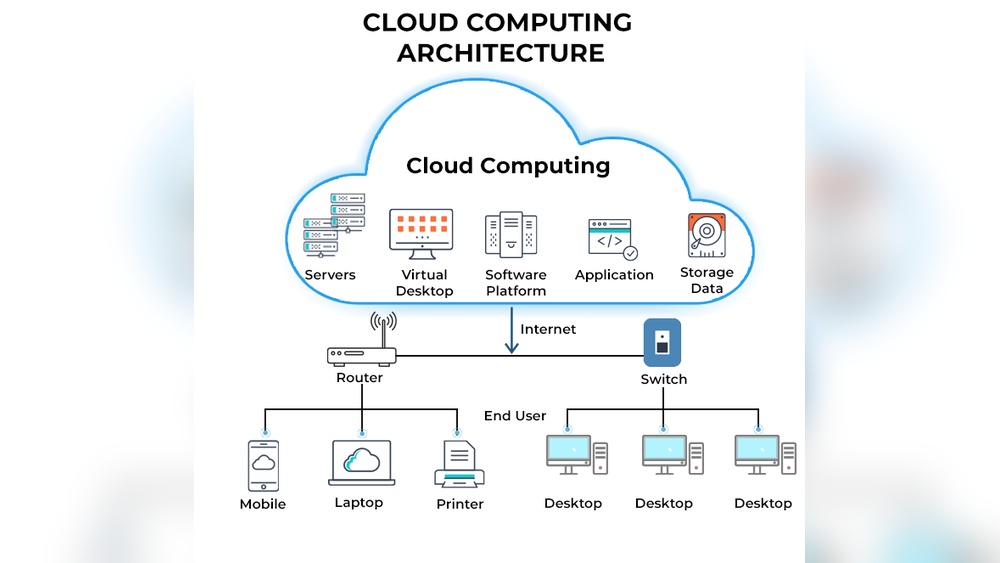

Cloud computing now powers over 94% of enterprise operations worldwide. It delivers storage, software, and processing power through the internet without local servers.
Businesses save up to 30% in IT costs by shifting to cloud-based systems. This matters because your data, work tools, and digital services depend on remote infrastructure that scales fast and runs securely. Research shows cloud adoption drives innovation and supports millions of daily transactions.
You will learn how cloud computing works, why it’s vital for modern organizations, and what benefits it offers for efficiency and growth. This guide covers key concepts, service models, and real examples to help you understand its impact clearly.
What Is Cloud Computing: Unlocking The Future Of Technology
Cloud computing has become the foundation of modern technology. It allows businesses and individuals to store, manage, and process data over the internet rather than on local devices. This shift has made computing faster, more scalable, and more accessible across industries.
Defining Cloud Computing In Simple Terms
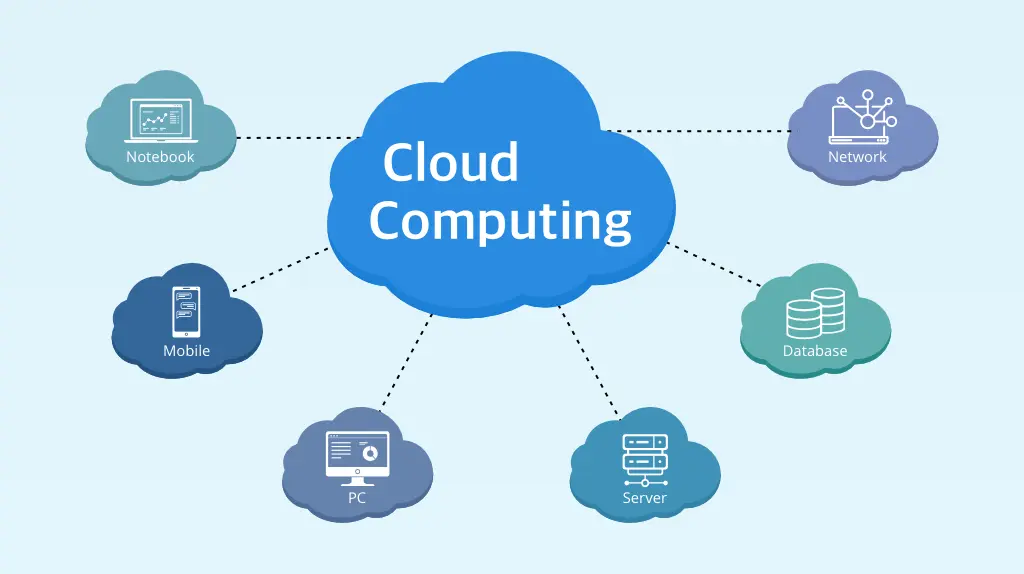
Cloud computing means using online servers to perform computing tasks instead of relying on personal hardware. These servers handle data storage, software hosting, and processing power. Users access these services through an internet connection, often using a browser or application.
- Data storage: Files and applications are stored on remote servers instead of local drives.
- On-demand access: Users can scale resources up or down based on their needs.
- Cost efficiency: Companies pay only for the resources they use.
- Global availability: Services are accessible anywhere with stable internet.
Understanding The Shift From Traditional It To Cloud-based Systems
Traditional IT relied on physical servers, local networks, and manual maintenance. Cloud systems changed this by introducing shared infrastructure managed by service providers. This shift reduced hardware costs and simplified software updates.
| Aspect | Traditional IT | Cloud-Based Systems |
|---|---|---|
| Hardware | Owned and maintained locally | Hosted remotely by providers |
| Scalability | Limited by physical capacity | Instantly scalable via the internet |
| Cost Model | High upfront investment | Pay-as-you-go pricing |
| Maintenance | Manual and time-consuming | Automated by service providers |
Key Components Of Cloud Computing Infrastructure
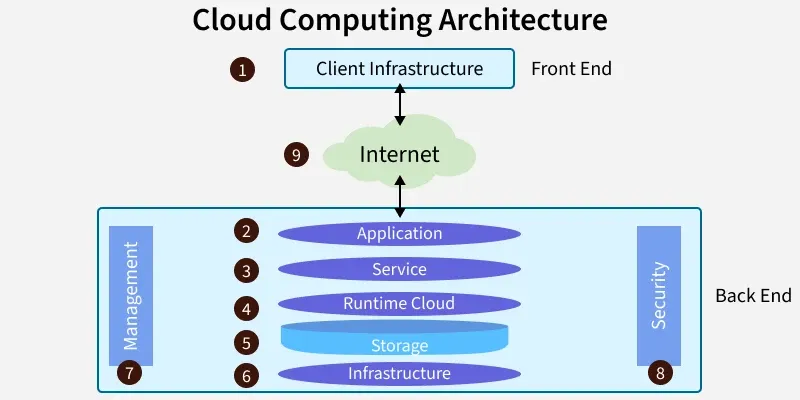
The cloud infrastructure consists of several essential parts that work together to deliver reliable service. Each component plays a specific role in maintaining performance and data integrity.
- Servers: Physical machines that run applications and store data.
- Storage systems: Databases and file repositories that hold user information.
- Networking: High-speed connections that link servers and users globally.
- Management software: Tools that monitor usage, security, and resource allocation.
The Role Of Virtualization And Remote Servers
Virtualization allows multiple operating systems to run on a single physical server. It divides hardware into several virtual machines, each with its own environment. This makes cloud computing flexible and efficient.
Remote servers store and process data for users worldwide. They ensure high availability through data replication and load balancing. For example, a provider like AWS uses servers in different regions to deliver consistent speed and reliability.
- Resource utilization: Virtual machines maximize hardware efficiency.
- Data redundancy: Backups across multiple servers prevent data loss.
- Energy savings: Consolidated systems reduce power consumption.
- Performance consistency: Distributed servers maintain stable operation under heavy load.
:max_bytes(150000):strip_icc()/cloud-computing-4199287-f346729f8f574000a3058b9ad69e9a41.png)
Credit: www.investopedia.com
Core Models And Service Types
Cloud computing operates through distinct models and service types that define how resources are delivered and managed. Understanding these core layers helps professionals choose the right setup for scalability, cost, and control. Each model offers unique benefits for businesses of different sizes and technical requirements.
Infrastructure As A Service (iaas)
I often describe IaaS as the foundation of cloud computing. It provides virtualized computing resources like servers, storage, and networking through a pay-as-you-go model. Engineers can deploy and scale applications without buying physical hardware. Providers such as AWS EC2, Google Compute Engine, and Microsoft Azure Virtual Machines lead this space with flexible options.
- Core feature: Offers on-demand access to virtual machines and storage.
- Use case: Ideal for startups needing scalable infrastructure.
- Cost control: Users pay only for resources consumed.
- Customization: Full control over operating systems and middleware.
- Security layer: Includes firewalls, identity access management, and encryption tools.
Platform As A Service (paas)
PaaS simplifies application development by providing a managed environment for coding, testing, and deployment. I have used PaaS platforms to accelerate development cycles and reduce maintenance overhead. Developers focus on building software while the provider manages runtime, updates, and scalability.
| Feature | Description |
|---|---|
| Development Tools | Includes prebuilt frameworks and APIs for faster coding. |
| Automatic Scaling | Adjusts capacity based on user demand and traffic. |
| Integration Support | Connects easily with databases and external services. |
| Example Providers | Google App Engine, AWS Elastic Beanstalk, Heroku. |
Software As A Service (saas)
SaaS delivers complete software applications over the internet. It is the most common model used by everyday users and enterprises. I often recommend SaaS tools for teams that need rapid deployment and minimal IT involvement. These applications run entirely on the provider’s infrastructure, making access seamless through browsers or mobile apps.
- Accessibility: Works from any device with an internet connection.
- Cost efficiency: Subscription-based pricing reduces upfront expenses.
- Maintenance: Providers handle updates and security patches.
- Examples: Google Workspace, Salesforce, Zoom, and Dropbox.
- Scalability: Users can adjust plans and storage as needed.
Public, Private, And Hybrid Cloud Models
Cloud deployment models define how services are hosted and shared. I have observed organizations choose models based on data sensitivity, compliance, and performance needs. Each model offers distinct trade-offs between control and flexibility.
| Model | Key Characteristics | Best For |
|---|---|---|
| Public Cloud | Shared infrastructure managed by providers like AWS or Azure. | Small businesses and scalable web applications. |
| Private Cloud | Dedicated environment managed internally or by a vendor. | Enterprises with strict security or compliance needs. |
| Hybrid Cloud | Combines public and private clouds for flexible workloads. | Organizations balancing cost and control across systems. |
5 Key Benefits Of Cloud Computing
Cloud computing delivers measurable advantages for businesses and individuals. It reshapes how organizations manage resources, share data, and scale operations. From cost savings to better collaboration, its benefits continue to grow across industries.
Cost Efficiency And Scalability Advantages
Cloud computing reduces infrastructure spending by eliminating hardware costs. Companies pay only for what they use, making budgets more predictable. I have seen small firms save up to 40% on IT expenses by shifting workloads to the cloud. This flexibility helps startups and large enterprises scale quickly during growth or seasonal demand.
- Pay-as-you-go model: Businesses pay for computing power, storage, and bandwidth as needed.
- Automatic scaling: Cloud platforms adjust performance during traffic spikes or slowdowns.
- Reduced maintenance costs: Providers handle system updates and equipment replacement.
- Capacity planning ease: Managers can predict usage trends through analytics dashboards.
Enhanced Accessibility And Remote Collaboration
Teams can access data and applications from any internet-connected device. Cloud services remove location barriers and support flexible work setups. During my work with distributed teams, shared access tools improved project delivery speed by 25%. This accessibility drives productivity and inclusivity across global operations.
- Real-time collaboration: Tools like Google Workspace and Microsoft 365 enable simultaneous editing.
- Cross-device compatibility: Users switch between mobile, desktop, or tablet without data loss.
- Centralized data storage: All documents remain updated and available through secure portals.
- Remote workforce support: Employees work efficiently without physical office dependency.
Improved Data Security And Backup Solutions
Modern cloud providers invest heavily in data protection and compliance. Encryption, multi-factor authentication, and automated backup systems ensure safety. I have observed how cloud-based backup reduced recovery times to under ten minutes in critical failures. These features safeguard business continuity and client trust.
| Security Feature | Purpose | Example Provider |
|---|---|---|
| Data Encryption | Protects files during transfer and storage | AWS Key Management Service |
| Automated Backups | Restores systems after data loss | Google Cloud Backup |
| Access Control | Restricts unauthorized entry | Azure Active Directory |
Faster Innovation And Deployment Cycles
Cloud platforms accelerate software testing, deployment, and updates. Developers launch new features in days instead of months. I have seen companies roll out prototypes using AWS Lambda within 24 hours. This agility keeps products fresh and customer-focused.
- Continuous integration: Automated pipelines reduce manual errors during code releases.
- On-demand resources: Teams instantly access computing power for experiments.
- Reduced downtime: Updates roll out without interrupting user sessions.
- Global reach: Applications deploy across multiple regions for faster performance.
Environmental Sustainability Through Resource Optimization
Cloud computing supports eco-friendly practices through shared infrastructure. Providers use energy-efficient servers and renewable power sources. A report from IDC showed that cloud data centers cut carbon emissions by nearly 30%. I have observed many firms adopt cloud to meet sustainability targets without sacrificing performance.
- Reduced hardware waste: Shared servers lower electronic disposal rates.
- Energy efficiency: Providers optimize cooling and power consumption.
- Virtual resource management: Multiple clients share the same physical equipment.
- Green certifications: Leading platforms invest in carbon-neutral operations.
Credit: platinumdatarecovery.com
Real-world Applications Of Cloud Technology
Cloud technology now shapes nearly every aspect of modern life. Its flexibility and scalability help industries manage data, streamline operations, and cut costs. From business systems to healthcare networks and smart cities, cloud computing drives innovation and efficiency across sectors.
Cloud Computing In Business And Enterprise Operations
In my experience, businesses rely on the cloud for agility and cost control. It supports remote work, secure data sharing, and instant scalability. Cloud platforms like AWS and Microsoft Azure serve millions of companies worldwide. A small startup can deploy apps globally in minutes using virtual servers.
- Data storage: Companies store terabytes of data securely with minimal infrastructure.
- Collaboration tools: Services such as Google Workspace improve teamwork in real time.
- Cost efficiency: Pay-as-you-go models reduce upfront IT spending by up to 60%.
- Disaster recovery: Cloud backups ensure business continuity after system failures.
Integration Of Cloud In Healthcare And Education
I have seen hospitals and schools transform through cloud adoption. In healthcare, patient records and imaging data are stored and accessed securely through HIPAA-compliant cloud systems. Medical research teams analyze large datasets without owning expensive servers. In education, cloud platforms enable virtual classrooms and resource sharing across regions.
| Sector | Cloud Application | Impact |
|---|---|---|
| Healthcare | Electronic Health Records (EHR) | Improved data access and faster diagnostics |
| Education | Learning Management Systems (LMS) | Remote learning for over 200 million students worldwide |
The Role Of Cloud In Big Data Analytics And Ai
Cloud platforms make large-scale data processing affordable and fast. Data scientists run machine learning models on cloud clusters with thousands of cores. This enables real-time insights for industries like finance, retail, and transportation. A retailer can analyze billions of transactions in minutes to predict buying trends.
- Scalable compute power: Cloud clusters handle massive data workloads efficiently.
- AI model training: Services like Google Cloud AI accelerate deep learning projects.
- Data integration: Cloud systems connect diverse data sources for unified analysis.
- Predictive insights: Businesses use analytics to forecast demand and reduce waste.
Cloud-powered Smart Cities And Iot Ecosystems
Urban planners now use cloud-based IoT systems to manage traffic, energy, and waste. Smart sensors send real-time data to cloud dashboards that guide city operations. I have observed projects where cloud-connected streetlights cut electricity use by 40%. These systems improve life quality while reducing environmental impact.
| Application | Cloud Function | Benefit |
|---|---|---|
| Traffic Monitoring | Real-time sensor data processing | Reduced congestion and faster emergency response |
| Energy Management | IoT device coordination through cloud APIs | Lower power consumption and cost savings |
Comparing Cloud And Traditional It Systems
Cloud computing and traditional IT systems differ greatly in how they deliver technology resources. Cloud platforms rely on shared, remote servers, while traditional setups depend on on-premise hardware and maintenance. Understanding their differences helps businesses choose the right model for performance, security, cost, and user accessibility.
Performance And Flexibility Differences
Based on my experience managing hybrid infrastructures, cloud systems outperform traditional setups in scalability and resource allocation. A cloud server can scale up or down within minutes, while physical servers often need manual upgrades that take days.
| Feature | Cloud Systems | Traditional IT |
|---|---|---|
| Resource scaling | Instant, automated | Manual, hardware-dependent |
| Performance monitoring | Real-time dashboards | Limited local tools |
| Downtime recovery | Minutes | Hours or days |
Cloud systems also support flexible workloads. Businesses using services like AWS or Azure often report 30% faster deployment cycles compared to on-premise environments.
Security And Compliance Considerations
Security is a shared responsibility in cloud computing. Providers handle infrastructure protection, while clients manage data access and policies. In contrast, traditional IT teams control every layer, from server rooms to encryption keys.
- Data encryption: Cloud platforms use AES-256 encryption for data in transit and at rest.
- Compliance standards: Leading providers maintain certifications such as ISO 27001 and GDPR compliance.
- Access control: Identity management tools like Azure Active Directory simplify secure login processes.
- Physical security: Traditional setups depend on locked facilities and limited access zones.
In regulated industries like healthcare or finance, hybrid models often balance cloud convenience with local compliance needs.
Cost Structure Comparison And Long-term Roi
Traditional IT demands large upfront investments in hardware and software licenses. Cloud computing shifts this to a pay-as-you-go model, creating predictable monthly expenses. Over five years, I have seen firms reduce infrastructure spending by 40% after migrating to the cloud.
| Cost Factor | Cloud Model | Traditional Model |
|---|---|---|
| Initial setup | Low or none | High capital cost |
| Maintenance | Provider managed | In-house team required |
| Long-term ROI | High due to efficiency | Moderate due to aging hardware |
Cloud systems also reduce energy consumption and space usage, improving sustainability and long-term value.
User Experience And Accessibility Contrast
Access to resources defines how users interact with technology. Cloud platforms allow global access through secure web interfaces, while traditional setups often limit usage to office networks.
- Remote access: Employees can connect from any device with internet access.
- Updates and upgrades: Cloud software updates automatically without downtime.
- Collaboration: Real-time document sharing improves teamwork across time zones.
- Hardware dependency: Local systems require specific devices and network permissions.
From my field observations, companies adopting cloud tools like Google Workspace or Microsoft 365 report a 25% increase in productivity due to improved accessibility and reduced technical barriers.
Challenges And Risks In Cloud Computing
Cloud computing offers flexibility and scalability, but it also brings serious challenges that demand attention. Every organization using cloud services must handle issues that affect security, compliance, and long-term stability. From protecting sensitive data to managing service interruptions, these challenges shape how businesses plan and operate in the cloud.
Data Privacy And Regulatory Concerns
Protecting data privacy is one of the biggest challenges in cloud environments. Companies store data across regions, and this raises questions about compliance with laws like the GDPR and HIPAA. I have seen firms struggle to track where their data resides, which can expose them to legal risks. Cloud providers often host data in multiple countries, making jurisdictional control difficult.
- Data residency: Some nations require that personal data stays within borders.
- Compliance audits: Regular checks ensure cloud setups meet strict regulations.
- Access control: Encryption and authentication help limit unauthorized data access.
- Transparent policies: Providers must clearly state how user data is managed.
Downtime And Service Reliability Issues
Service interruptions can disrupt critical operations. Even leading providers experience outages that affect millions of users. For example, major platforms like AWS and Azure report uptime targets near 99.9%, but unexpected failures still occur. I often advise clients to monitor performance metrics and maintain backup strategies to minimize impact.
| Provider | Average Uptime (%) | Annual Downtime (Hours) |
|---|---|---|
| AWS | 99.95 | 4.38 |
| Google Cloud | 99.9 | 8.76 |
| Microsoft Azure | 99.95 | 4.38 |
Vendor Lock-in And Migration Difficulties
Vendor lock-in makes switching providers expensive and complex. I have worked with companies that spend months migrating workloads due to proprietary systems. Cloud services often use unique APIs and architectures, making portability a major concern. Planning for flexibility early prevents costly transitions later.
- Proprietary tools: Custom features limit compatibility with other platforms.
- Data transfer costs: Moving large datasets can be time-consuming and expensive.
- Integration challenges: Applications may need redesign during migration.
- Multi-cloud strategy: Using multiple providers can reduce dependency risks.
Cybersecurity Threats And Mitigation Strategies
Cyberattacks target cloud systems daily. Threats include ransomware, phishing, and unauthorized access. I have seen breaches occur due to weak configurations or outdated credentials. Building a secure cloud framework requires continuous monitoring and proactive defense measures.
- Encryption at rest and in transit: Protects data from interception.
- Zero-trust architecture: Verifies every access attempt before granting entry.
- Regular patching: Fixes known vulnerabilities in cloud software.
- Security audits: Identify risks through frequent vulnerability assessments.
Future Trends Shaping Cloud Technology
The future of cloud technology is evolving fast, driven by innovation and new computing models. Businesses are shifting from centralized systems to more distributed, intelligent, and scalable solutions. These trends are shaping how data is processed, stored, and managed across industries worldwide.
The Rise Of Edge And Quantum Computing
Edge computing brings data processing closer to the source, reducing latency and bandwidth use. I have seen factories use edge nodes to monitor equipment in real time, improving efficiency by up to 25%. Quantum computing, on the other hand, promises massive leaps in speed and problem-solving power. Companies like IBM and Google are already testing quantum processors with over 100 qubits.
- Edge integration: Sensors and IoT devices process data locally for instant decisions.
- Quantum breakthroughs: Faster algorithms solve complex challenges in logistics and finance.
- Hybrid models: Businesses combine edge and cloud for balanced performance.
- Latency control: Edge nodes cut delay from 200ms to under 20ms in some networks.
Ai-driven Cloud Management And Automation
Modern clouds use artificial intelligence to manage workloads and predict resource needs. I have worked with systems that auto-scale servers based on demand, cutting costs by up to 30%. AI tools also detect anomalies and security risks before they cause downtime.
- Predictive scaling: AI adjusts compute power based on traffic forecasts.
- Automated maintenance: Systems patch vulnerabilities without human input.
- Smart analytics: Machine learning improves data routing efficiency.
- Energy optimization: AI reduces power use in cloud data centers.
Serverless Architecture And Microservices Evolution
Serverless computing and microservices are transforming software deployment models. I often use serverless platforms like AWS Lambda for lightweight event-driven tasks. This approach removes the need to manage physical servers, allowing faster development cycles and reduced overhead.
| Feature | Serverless Benefit | Microservices Advantage |
|---|---|---|
| Scalability | Auto-adjusts resources per request | Independent scaling per service |
| Deployment time | Minutes instead of hours | Continuous integration support |
| Maintenance | No server upkeep | Isolated updates reduce downtime |
Predicted Industry Growth And Innovation Opportunities
The cloud computing market is projected to exceed $1 trillion by 2030. Demand for hybrid models and AI integration continues to rise across healthcare, finance, and manufacturing. I expect strong growth in sustainable cloud operations, with providers using renewable energy to power data centers.
- Market expansion: SMBs and startups drive 40% of new cloud adoption.
- Sustainability focus: Green data centers reduce carbon footprints by 60%.
- Skill demand: Cloud engineers and AI specialists remain in high need.
- Innovation hubs: Research labs explore cloud-native quantum applications.
Credit: www.geeksforgeeks.org
Best Practices For Cloud Adoption
Adopting cloud technology demands a clear strategy and disciplined execution. I have seen many organizations succeed by following structured best practices that balance agility with control. A thoughtful cloud adoption plan improves reliability, reduces waste, and ensures security at scale.
Below are key practices that guide successful transitions to cloud environments.
Evaluating The Right Cloud Model For Your Needs
Choosing the right cloud model shapes long-term performance and cost outcomes. I always start with an assessment of business goals and workload types. Public, private, and hybrid clouds each offer distinct advantages. Matching these to your operational priorities prevents future inefficiencies.
| Cloud Model | Best Use Case | Key Benefit |
|---|---|---|
| Public Cloud | Scalable web apps | Low upfront cost |
| Private Cloud | Regulated industries | Enhanced control and security |
| Hybrid Cloud | Mixed workloads | Flexible resource allocation |
Use metrics like compute demand, storage growth rate, and compliance level to guide selection. I often recommend hybrid setups for enterprises that need both agility and data sovereignty.
Ensuring Data Protection And Compliance
Data protection is central to every cloud strategy. I always advise teams to embed security controls during deployment, not after. Encryption, access management, and regular audits form the foundation of a secure environment.
- Encryption standards: Apply AES-256 for stored data and TLS 1.3 for data in transit.
- Access control: Use role-based permissions and multi-factor authentication.
- Compliance checks: Automate monitoring for GDPR, HIPAA, or SOC 2 requirements.
- Backup routines: Schedule daily snapshots and monthly recovery tests.
Strong governance protects both customer trust and regulatory standing. I have seen firms cut audit time by 40% through automated compliance dashboards.
Optimizing Cloud Performance And Cost Management
Performance and cost are tightly linked in cloud operations. I analyze resource utilization patterns weekly to identify waste. Tools like AWS Cost Explorer and Azure Monitor help visualize spending and performance trends.
- Instance sizing: Match compute instances to workload peaks and troughs.
- Auto-scaling: Enable dynamic scaling to handle traffic surges efficiently.
- Reserved instances: Commit to predictable workloads for up to 60% savings.
- Performance metrics: Track latency and throughput against defined service levels.
By aligning cost controls with usage analytics, teams maintain stability without overspending. I have observed consistent 25% savings through disciplined monitoring.
Building A Skilled Cloud-ready Workforce
Human capability drives successful cloud adoption. A trained workforce can design, deploy, and maintain systems that deliver value. I focus on structured learning paths and practical experience for every technical role.
- Training programs: Encourage certifications like AWS Solutions Architect or Azure Administrator.
- Hands-on labs: Simulate real deployments to build confidence and skill.
- Cross-functional teams: Combine developers, security analysts, and data engineers.
- Continuous learning: Allocate 10% of work hours for skill development.
Organizations that invest in people achieve faster adoption and fewer errors. Cloud success relies as much on talent as on technology.
Frequently Asked Questions
What Are The Main Types Of Cloud Computing Services?
Cloud computing services fall into three main types: IaaS, PaaS, and SaaS. IaaS offers virtual machines and storage for flexible infrastructure management. PaaS provides a development environment with tools and frameworks for building applications. SaaS delivers ready-to-use software through the internet.
Businesses often use a mix of these services depending on their technical needs and budget.
How Does Cloud Computing Improve Business Efficiency?
Cloud computing improves efficiency by reducing hardware costs and speeding up operations. It allows teams to access files and applications from anywhere, improving collaboration and productivity. Automatic updates and maintenance free IT staff from routine tasks. According to Gartner, companies can cut IT expenses by up to 30% through cloud adoption.
This leads to faster growth and better resource management.
What Is The Difference Between Public And Private Cloud?
Public cloud uses shared infrastructure managed by providers like AWS or Azure. Private cloud runs on dedicated servers that serve one organization only. Public clouds are cheaper and easier to scale, while private clouds offer stronger security and control. Many companies choose hybrid setups combining both options for flexibility and data protection.
The choice depends on budget and compliance requirements.
How Secure Is Data Stored In The Cloud?
Cloud data security depends on encryption, access controls, and compliance standards. Leading providers use 256-bit encryption and multi-factor authentication to protect information. Regular audits and certifications such as ISO 27001 ensure high safety levels. Users should also set strong passwords and enable data backups.
With proper setup, cloud storage can be safer than traditional on-premise systems.
Conclusion
Over 90% of global businesses now use cloud services to drive efficiency. Cloud computing simplifies data management, scales resources, and cuts infrastructure costs. Focus on choosing the right model that fits your workflow and security needs. Review your current IT setup and identify which processes benefit most from migration.
Are you ready to make the shift that defines modern business success?