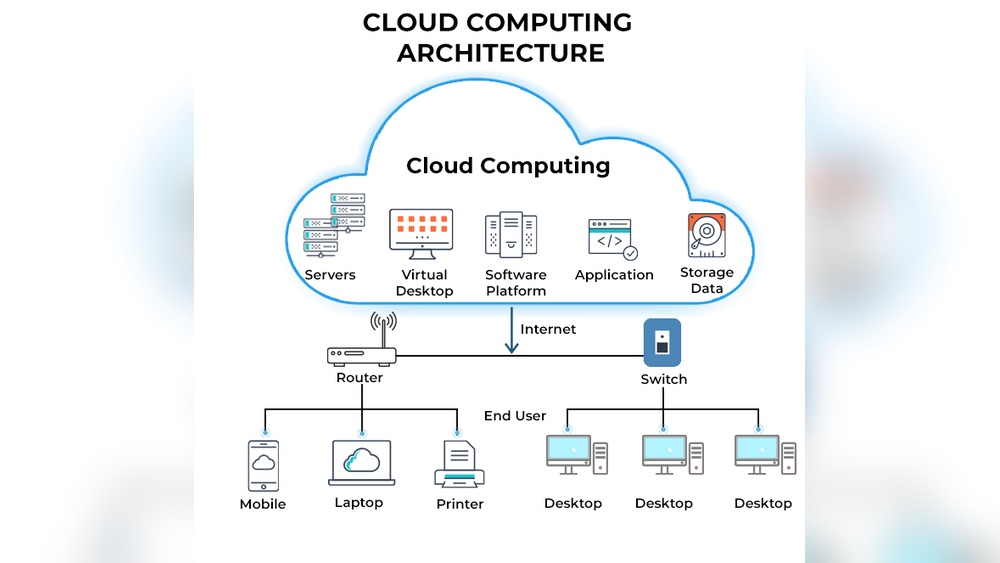

Cloud computing means storing and accessing data over the internet. It lets people use online servers instead of keeping files on a computer.
Cloud computing has changed how businesses and individuals handle technology. It gives easy access to data, applications, and services from anywhere. This concept allows users to save money, work faster, and stay flexible. With cloud platforms, companies can scale their operations without buying expensive hardware.
Everyday users also enjoy simple storage and online backups. From email services to streaming platforms, cloud computing supports many daily tasks. Understanding this technology helps you see how modern digital life works. In this blog, you will learn what cloud computing is, how it functions, and why it matters in today’s connected world.
:max_bytes(150000):strip_icc()/cloud-computing-4199287-f346729f8f574000a3058b9ad69e9a41.png)
Credit: www.investopedia.com
Rise Of Cloud Computing
Cloud computing didn’t just appear overnight—it grew out of a need for flexibility, speed, and cost control. Businesses wanted to focus on ideas, not on maintaining bulky hardware. You’ve probably felt that shift yourself, from saving everything on a local drive to relying on online storage that’s accessible anywhere.
There was a time when buying new servers meant planning weeks ahead and spending thousands of dollars. Now, you can add virtual storage or computing power in minutes. This shift changed how organizations think about technology and made innovation faster than ever.
From Physical Servers To Virtual Environments
Before cloud computing, companies used physical servers stacked in rooms that needed constant maintenance. I remember working in a small firm where adding a single server meant downtime and a lot of stress. The space, cost, and energy demands made scaling almost impossible.
Virtual environments changed that. They allowed businesses to create multiple “virtual machines” on a single physical server. You could run different applications without worrying about hardware limits. It was like moving from a cramped office to a flexible workspace—only this time, digitally.
Now, instead of buying servers, you rent computing resources on demand. This model reduces waste and lets you pay only for what you use. It also means smaller teams can compete with larger organizations because access to technology isn’t restricted by budget anymore.
Key Milestones Shaping Cloud Adoption
Several turning points pushed cloud computing forward. The launch of Amazon Web Services (AWS) in 2006 made renting computing power a reality. Soon after, Google and Microsoft joined the race, offering tools that helped businesses move online faster.
High-speed internet and mobile connectivity made cloud services practical for everyone. Suddenly, you could edit a file on your phone and see updates instantly on your laptop. Remote work became easier, and collaboration no longer depended on being in the same room.
Another major milestone was the rise of subscription-based software like Office 365 and Google Workspace. Instead of installing updates manually, you always have the latest version. This changed how you think about ownership—software became a service, not a product.
So, where does this leave you today? The cloud isn’t just a tech trend—it’s now the foundation of how modern businesses operate. The question is, how are you using it to make your work smarter and more efficient?
Core Concepts Of The Cloud
Understanding the core concepts of cloud computing helps you make smarter decisions about how you store and manage data. The cloud isn’t just a buzzword—it’s a system built to simplify how you use technology every day. If you’ve ever uploaded photos to an online drive or used a shared document, you’ve already experienced the power of the cloud.
What makes the cloud effective is how it delivers computing resources—like storage, software, and servers—over the internet. You don’t need to own expensive hardware or manage complex systems. You simply access what you need, when you need it.
Public, Private, And Hybrid Models
The cloud comes in three main types—public, private, and hybrid. Each one offers different levels of control, security, and flexibility.
- Public cloud: Services are shared over the internet by providers like AWS, Google Cloud, or Microsoft Azure. It’s ideal if you want scalability without heavy maintenance costs.
- Private cloud: Used by one organization only. It gives you more control and security since resources aren’t shared with others. Many companies choose this for sensitive data.
- Hybrid cloud: A mix of both. You can keep critical data on a private cloud while using public services for less sensitive tasks. This balance helps manage costs and security efficiently.
Think about your own needs—do you want full control, or do you prefer flexibility and lower costs? The model you choose shapes how your business handles data and responds to change.
How Cloud Architecture Transforms Data Management
Cloud architecture changes how you store, access, and protect information. Instead of keeping everything on one physical server, your data is distributed across secure, remote servers. This design improves reliability and reduces downtime.
I once worked with a small team that lost critical files after a local system crash. Moving to cloud storage solved that problem instantly. Backups happened automatically, and everyone could access files from anywhere.
Cloud systems also let you scale easily. When your data grows, you can add more storage without replacing hardware. Updates happen automatically, keeping your tools secure and up to date.
Ask yourself—how much time do you spend worrying about data loss or system failures? The right cloud setup can free you from those concerns and let you focus on innovation instead of maintenance.
Driving Forces Behind Cloud Growth
Cloud computing is growing faster than most people expected. Businesses of all sizes are moving their operations online, not just because it’s trendy, but because it solves real problems. You might wonder—what exactly is pushing this rapid growth?
Let’s look at two main reasons behind this shift: scalability and flexibility advantages, and cost efficiency with better resource use.
Scalability And Flexibility Advantages
Think about how your business needs change throughout the year. During busy seasons, you may need more storage or computing power. During slower times, you might use less. Cloud platforms let you adjust resources instantly without buying new hardware or waiting weeks for setup.
I remember helping a small e-commerce store prepare for holiday sales. Instead of investing thousands in servers, they simply increased their cloud capacity for a few weeks. Once the rush was over, they scaled back down. It was simple, fast, and cost-effective.
This flexibility means you can test new ideas or launch products without worrying about technical limits. You can grow at your own pace and pay only for what you actually use. Isn’t that kind of control something every business wants?
Cost Efficiency And Resource Optimization
Cloud computing changes how businesses spend money on technology. Instead of large upfront costs for hardware and maintenance, you pay based on usage. This helps you manage your budget better and avoid wasting resources.
Many companies also discover hidden savings. For example, automatic software updates reduce the need for IT staff to handle manual tasks. Energy costs drop because servers run in efficient data centers, not in your office.
When you focus on using resources wisely, you can direct funds to growth areas—like marketing or product development. The question is, how much could your business save if it optimized technology spending this way?
The rise of cloud computing isn’t just about new technology—it’s about smarter, more agile business decisions. Companies that understand these driving forces are the ones staying ahead in the digital race.
Cloud Service Models
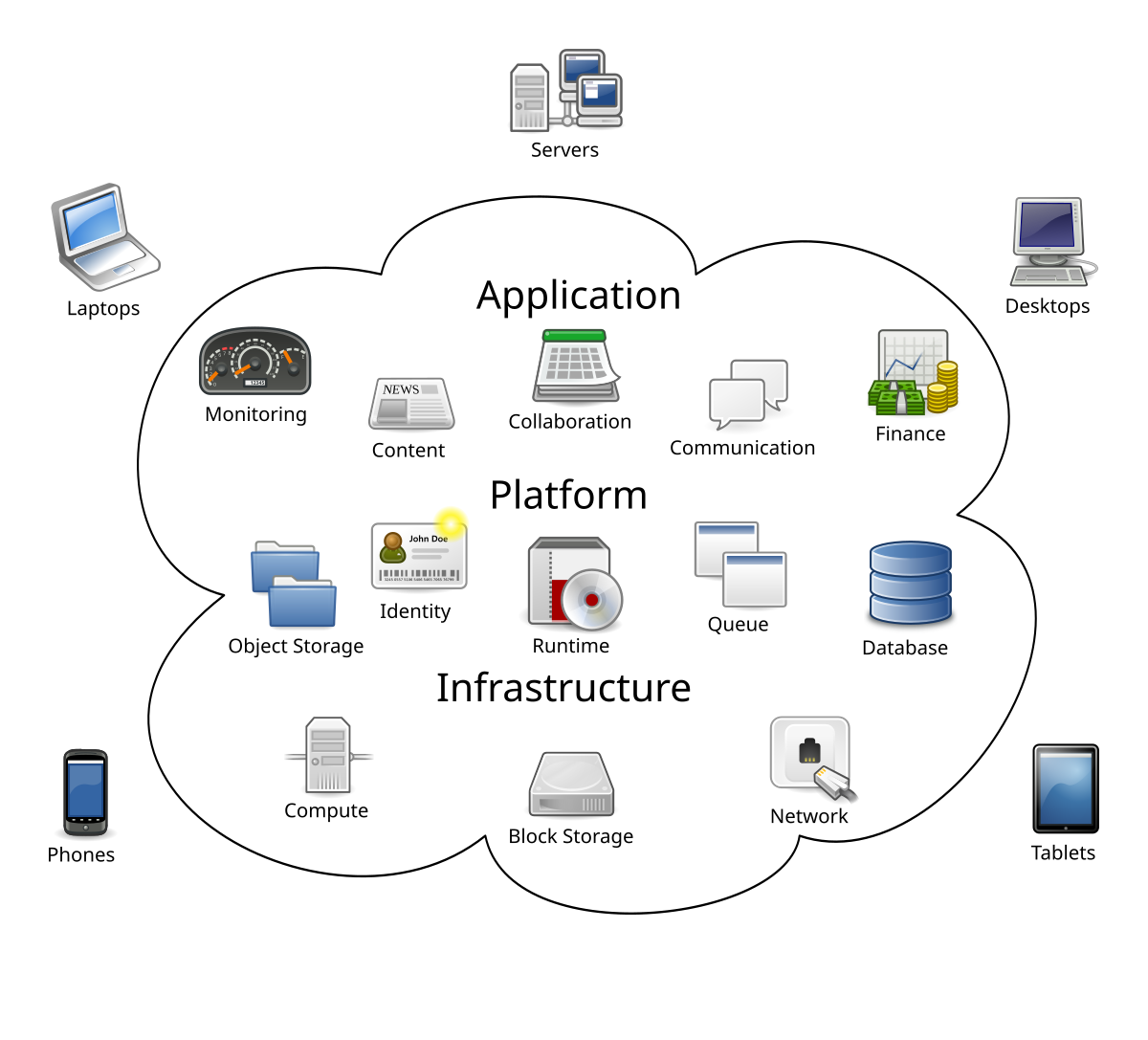
Cloud Service Models are the backbone of how we use and pay for cloud computing. They define what part of the computing process is managed by you and what is handled by the cloud provider. Understanding them helps you choose the right balance between control, flexibility, and ease of use.
Think of it this way — when you rent a house, you decide how much you want to maintain yourself versus letting the landlord handle things. Cloud service models work the same way. Some give you full control over everything, while others let you focus only on your application or business logic.
Infrastructure As A Service (iaas)
IaaS gives you virtual access to computing resources like servers, storage, and networks. You manage the operating system, applications, and data, while the provider manages the hardware and virtualization layer.
Say you run a small online store and want to scale quickly during holiday sales. With IaaS, you can add more virtual servers instantly without buying new physical machines. Providers like AWS, Google Cloud, and Microsoft Azure make this easy.
The best part? You pay only for what you use. That means no wasted resources sitting idle when your traffic slows down.
Platform As A Service (paas)
PaaS takes things one step further. It provides a ready-to-use platform where you can build, test, and deploy applications without worrying about managing servers or operating systems.
I once built a small web app using Google App Engine. I didn’t have to think about updates or scaling — the platform handled it all. That freed me to focus on writing better code instead of managing infrastructure.
If you’re a developer who wants to move fast and stay focused on building, PaaS can be your best friend.
Software As A Service (saas)
SaaS is the most familiar cloud model. You access fully functional software over the internet — no installations, no maintenance, no updates to run manually.
Think of tools like Gmail, Zoom, or Salesforce. You log in, use the software, and everything works seamlessly. The provider handles storage, performance, and security behind the scenes.
For most businesses, SaaS removes the burden of software management. You can start using powerful tools instantly, paying a monthly fee instead of investing in licenses or hardware.
So, which model fits your needs best? The answer depends on how much control you want, how fast you want to move, and how much technical management you’re ready to handle.
Security And Compliance In The Cloud
Security and compliance are the backbone of trust in cloud computing. If you store your business data online, you want to know it’s safe and handled correctly. I remember the first time I moved a client’s database to the cloud—it felt like giving away the keys to the office. But soon, I learned that strong security protocols and compliance checks actually make the cloud safer than most local servers. Let’s look at how it works.
Data Protection And Encryption Practices
Data protection starts with encryption. This means your information is turned into unreadable code while it travels or sits in storage. Even if someone intercepts it, they can’t understand what they see.
Cloud providers use two main types of encryption—one for data in motion and another for data at rest. You can add extra layers like multi-factor authentication and role-based access control. These steps make sure only the right people can reach sensitive files.
Think about how you share files with your team. Are you using secure links or just email attachments? Small choices like this affect how safe your data remains in a cloud environment.
Regulatory Challenges And Solutions
Every country has its own data laws, and that creates challenges for businesses using global cloud services. You may need to follow GDPR in Europe, HIPAA in the U.S., or other local privacy rules. Keeping track of all of them can feel overwhelming.
Cloud providers now offer compliance-ready solutions that match these regulations. They provide audit trails, data residency options, and automated reporting tools. You can use these features to prove your compliance without spending hours on manual checks.
Ask yourself—does your cloud setup meet your industry’s compliance needs? If not, start by checking your provider’s certifications and update your internal policies accordingly. This simple audit can save you from costly penalties later.
Impact On Businesses And Industries
Cloud computing has changed how companies work, grow, and compete. It’s not just about storing data online—it’s about flexibility, speed, and smarter decision-making. You can now scale your business operations in minutes, not months.
Think about how retail businesses use cloud tools to track customer behavior instantly. Or how healthcare providers share patient records securely across locations. These changes are not small—they reshape entire industries.
But how exactly does cloud computing bring this shift? Let’s look at two areas where the impact is especially strong.
Cloud-driven Digital Transformation
Digital transformation used to mean buying expensive hardware and complex software. Now, with cloud computing, you simply add new services when you need them. It keeps your costs low and your teams agile.
Companies use cloud platforms to automate routine tasks and focus on innovation. A friend who runs a small design agency told me how switching to cloud-based collaboration tools saved her hours each week. She spends less time fixing tech issues and more time talking to clients.
Cloud computing also supports data-driven decisions. You can analyze customer trends in real time and adjust your strategy immediately. Isn’t that the kind of responsiveness every business wants today?
Emerging Opportunities For Startups And Enterprises
Cloud technology opens doors for both new and established businesses. Startups can launch products faster without worrying about server maintenance. Enterprises, on the other hand, can test new ideas without major upfront investment.
Let’s say you’re building an app. With cloud services, you can deploy it globally within hours. You only pay for what you use, which means your budget stays under control.
Even large companies benefit from this flexibility. Many use hybrid cloud setups to balance privacy and scalability. The real advantage? You can experiment, learn, and grow—all while staying efficient and secure.
Cloud computing isn’t just a tech trend—it’s a practical tool reshaping how you do business. Whether you’re a startup founder or managing a big enterprise, the cloud gives you choices you didn’t have before. What would your business look like if you fully used those choices?
Emerging Technologies Empowered By The Cloud
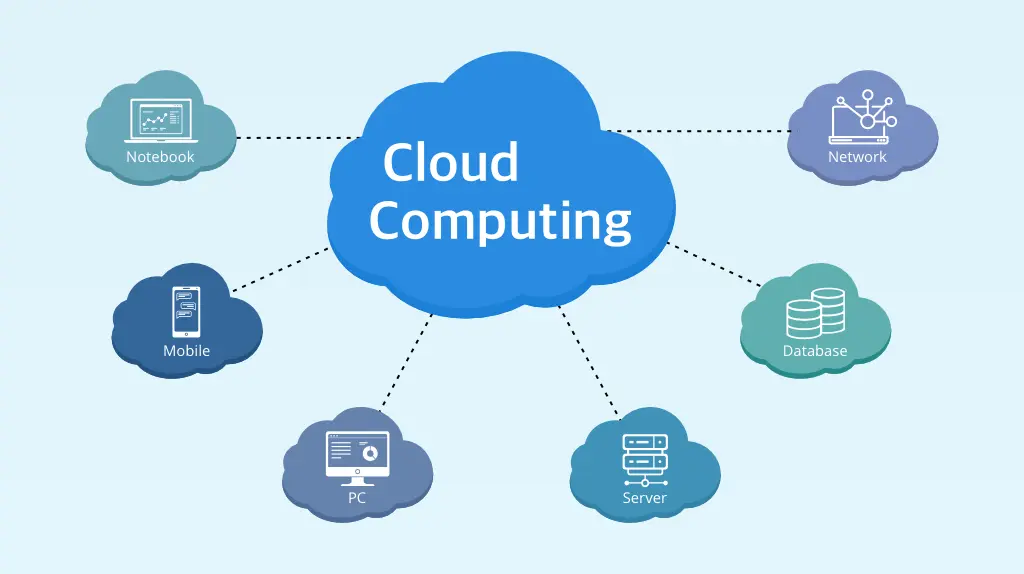
Cloud computing is not just a place to store files or run apps—it’s the engine behind many of today’s most exciting technologies. It gives businesses and individuals instant access to powerful tools that once required expensive hardware. You might already use some of these technologies daily without realizing how deeply they rely on the cloud.
Think about the apps on your phone that predict your next move, or the smart devices in your home that adjust automatically. They all use cloud power to process data, learn from patterns, and deliver smarter results. So, how exactly is the cloud fueling this wave of innovation?
Ai And Machine Learning Integration
Artificial Intelligence (AI) and Machine Learning (ML) thrive in cloud environments because they need huge amounts of data and computing power. The cloud makes it possible to train algorithms faster and deploy them globally. You don’t need a supercomputer—just access to cloud-based AI services.
Businesses use these services to predict customer behavior, automate tasks, and even detect fraud. You can apply the same concept to personal projects, like analyzing social media trends or improving your blog’s SEO performance. The best part? The cloud lets you scale your AI tools as your goals grow.
Have you ever noticed how your favorite streaming platform suggests exactly what you want to watch next? That’s AI in the cloud at work—constantly learning from millions of user interactions to refine predictions.
Iot And Edge Computing Advancements
The Internet of Things (IoT) connects everyday devices to the cloud, allowing them to send and receive data in real time. From smart thermostats to connected cars, these devices depend on cloud servers to analyze data and respond instantly. This connection creates smarter homes, safer cities, and more efficient industries.
Edge computing takes this idea further by processing data closer to where it’s generated—reducing delay and improving performance. Imagine a self-driving car that needs to make a split-second decision. It can’t wait for a cloud server miles away to respond. Edge computing solves that problem by handling critical tasks locally while still using the cloud for larger data analysis.
Can you see how this combination changes how we live and work? Cloud-powered IoT and edge computing give you faster experiences, better insights, and more control over technology that feels personal and responsive.
The cloud isn’t just supporting these technologies—it’s enabling their growth. As AI, ML, IoT, and edge computing continue to advance, the cloud will remain the invisible force that keeps them connected and capable.
Credit: platinumdatarecovery.com
Future Trends In Cloud Innovation
Cloud computing is changing faster than most people realize. What started as a way to store files online now powers entire businesses. The next wave of innovation is shaping how you build, deploy, and manage technology every day. You might be wondering, what’s coming next—and how can you prepare for it?
Let’s look at two major trends that are already transforming the way organizations use the cloud.
Serverless Computing Evolution
Serverless computing is gaining momentum because it removes the need to manage servers. You write your code, and the cloud provider handles the rest. This means less time spent on setup and more time focused on creating value.
Businesses now use serverless platforms to run applications that scale automatically. Imagine launching a new app without worrying about peak traffic or downtime. That’s the kind of flexibility serverless brings to your workflow.
One of my past projects used a serverless setup to handle unpredictable customer requests. The system scaled instantly, and we didn’t pay for idle resources. You can apply this same idea to reduce costs and improve responsiveness in your own projects.
Ask yourself—how much time do you spend maintaining servers that could be handled automatically?
Green Cloud And Sustainability Initiatives
Sustainability is becoming a core part of cloud innovation. Providers now design data centers that use renewable energy and efficient cooling systems. This shift isn’t just about reducing emissions—it’s about building smarter, cleaner technology.
Major companies like Google and Microsoft already aim for carbon neutrality across their cloud operations. These efforts make a big difference, especially as digital workloads keep growing. You can choose cloud services that align with your sustainability goals and measure their environmental impact.
Consider using multi-region setups that route traffic through greener data centers. It’s a simple change that supports global energy efficiency. The next time you deploy an app, think about how your cloud choices contribute to a sustainable future.
Would you prefer a faster cloud or a greener one—or can you have both?
Preparing For A Cloud-first World
The shift to a cloud-first world is not just a technical change—it’s a mindset. Businesses are rethinking how they manage data, build applications, and serve customers. You might already be using cloud apps daily without realizing it, but preparing for a full cloud-first approach takes more intention and planning.
When I first worked on a project that moved critical data to the cloud, I noticed how the biggest challenge wasn’t technology—it was people. Teams needed confidence and skills to handle new tools and workflows. That’s where preparation begins: knowing what to learn and how to adapt.
Skills And Tools For Cloud Professionals
To stay relevant in a cloud-first environment, you need practical cloud skills. Start with understanding basic cloud services like storage, computing power, and networking. Then, learn how different providers such as AWS, Microsoft Azure, and Google Cloud structure their offerings.
Technical skills matter, but problem-solving and communication are equally important. You’ll often work with cross-functional teams that include developers, security experts, and business analysts. Clear communication helps everyone move faster and avoid costly mistakes.
Here’s a quick table showing essential skills and tools you can start learning today:
| Skill Area | Examples |
|---|---|
| Cloud Platforms | AWS, Azure, Google Cloud |
| Automation Tools | Terraform, Ansible, Jenkins |
| Security Knowledge | Identity Management, Encryption, Compliance |
| Data Management | SQL, NoSQL, Data Lakes |
Ask yourself: which of these areas could you start improving this week? Small consistent learning makes a big difference over time.
Strategies For Seamless Migration
Moving to the cloud doesn’t mean copying everything at once. A smart migration starts with a clear plan and small steps. Identify which applications benefit most from the cloud—usually those needing flexibility or faster updates.
I once worked with a small retail business that moved their inventory system to the cloud first. That single step improved real-time stock visibility and reduced manual updates. It proved that migration success comes from focus, not speed.
Use these strategies to make your transition smoother:
- Assess readiness: Review your current infrastructure and data security policies before moving anything.
- Start small: Test with one non-critical system to understand costs and performance.
- Train your team: Make sure everyone knows the new tools and workflows.
- Monitor performance: Track usage and costs to avoid surprises.
Ask yourself—are your current systems flexible enough to handle future growth? Preparing for a cloud-first world means being ready to adjust quickly, learn continuously, and make data-driven choices every step of the way.
Credit: en.wikipedia.org
Frequently Asked Questions
What Is Cloud Computing In Simple Terms?
Cloud computing is the delivery of computing services like storage, servers, and software over the internet. It allows users to access data anytime, anywhere. Businesses use it to reduce costs and improve efficiency. It eliminates the need for physical hardware and complex infrastructure.
—
How Does Cloud Computing Work?
Cloud computing works by hosting data and applications on remote servers. These servers are managed by cloud providers. Users access them via the internet using secure connections. The provider handles maintenance, updates, and scalability. This ensures smooth performance and high availability of resources.
—
What Are The Main Types Of Cloud Computing?
Cloud computing has three main types: public, private, and hybrid clouds. Public clouds offer shared resources managed by providers. Private clouds are dedicated to one organization for better control. Hybrid clouds combine both models, offering flexibility, scalability, and optimized performance based on business needs.
—
What Are The Benefits Of Cloud Computing?
Cloud computing offers cost savings, scalability, and flexibility. It reduces hardware expenses and supports remote work. Businesses can quickly scale resources as needed. It enhances data security and disaster recovery. Cloud services also improve collaboration and simplify IT management, boosting overall productivity and innovation.
—
Conclusion
Cloud computing keeps growing and shaping how people use technology today. It helps store data safely and makes online work faster and easier. Businesses and individuals both gain more flexibility and lower costs. It supports teamwork and makes sharing information simple across devices.
The future of cloud computing looks bright with better speed and security. Choosing the right cloud service brings comfort and control. Easy access, quick updates, and smart tools make it useful for everyone. Cloud computing is not just a trend.
It is a smarter way to work and live online.