
Provides precise tracking and comfortable design for extended gaming sessions without discomfort.
Imagine you’re in the middle of a fast-paced game, and every second counts as you react to your opponents’ moves. With time pressure mounting, having a reliable tool that responds instantly can make all the difference between victory and defeat.
A quality gaming mouse offers precision, comfort, and speed, helping you stay ahead in those critical moments. Next, we’ll share expert picks to help you find the perfect fit for your gameplay.
Expert Picks For Best Gaming Mouse
Logitech G502 Hero Gaming Mouse
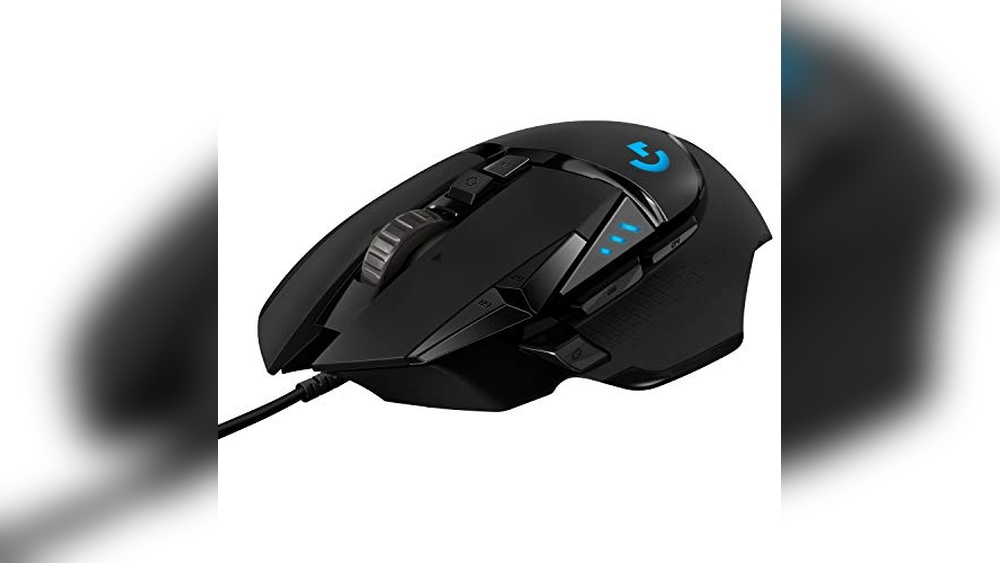
The Logitech G502 Hero stands out as one of the best gaming mouse options for those seeking precision and customization. Its advanced Hero 25K sensor, adjustable weights, and multiple programmable buttons make it a versatile choice for gamers who want reliable performance and tailored control.

This wired gaming mouse from Logitech offers a high-precision sensor that tracks movements accurately without smoothing or acceleration, giving gamers consistent control. The adjustable weight system and 11 customizable buttons provide flexibility to match different gaming styles, while RGB lighting adds a subtle touch of personalization.
In daily use, the G502 Hero feels comfortable and responsive, whether for extended gaming sessions or general PC work. Its mechanical switch button tensioning gives a satisfying click feel, and the onboard memory makes switching profiles seamless. Overall, it balances performance and comfort well.
Pros:
- Highly precise Hero 25K sensor with zero smoothing or acceleration
- Adjustable weight system for personalized balance
- 11 customizable buttons with onboard memory for multiple profiles
- Durable mechanical switch button tensioning for crisp feedback
- Programmable RGB lighting compatible with Logitech Lightsync
- Compatible with both PC and Mac
- Competitive pricing with significant savings
Cons:
- Wired design may limit mobility compared to wireless options
- May feel heavy for users preferring ultra-light mice
- Complex button layout might overwhelm beginners
My Honest Take
The Logitech G502 Hero is ideal for gamers who want precise control and the ability to customize their mouse extensively. It suits both casual and more competitive players, though beginners might need some time to get accustomed to its many buttons. After setup, the mouse delivers consistent performance and comfort for long sessions.
Setting up profiles through Logitech’s G HUB software is straightforward, which adds convenience. For peace of mind, the build quality feels solid and dependable. Personally, I appreciate its balance of features without unnecessary gimmicks.
| Best for | Why |
|---|---|
| Competitive Gamers | Precision sensor and customizable buttons enhance gameplay control |
| Custom Setup Enthusiasts | Adjustable weights and onboard memory allow personalized configurations |
| PC and Mac Users | Compatible with multiple platforms for versatile use |
| Budget-Conscious Buyers | High-end features at a discounted price |
Logitech G502 Lightspeed Wireless Mouse
The Logitech G502 Lightspeed Wireless Mouse stands out as a top choice for the Best Gaming Mouse category, offering professional-grade wireless performance and advanced customization options.

The Logitech G502 Lightspeed is a wireless gaming mouse that combines high-end hardware with wireless freedom. It features Logitech’s Hero 25K sensor, which delivers precise tracking without smoothing or acceleration, and it offers 11 customizable buttons to tailor your gaming experience. The mouse also supports PowerPlay wireless charging (sold separately), so you can keep it charged effortlessly while you play or rest.
In everyday use, the G502 Lightspeed feels reliable and comfortable, with a well-balanced weight and a hyper-fast scroll wheel that speeds up navigation. The wireless connection is ultra-fast and stable, making it easy to trust during long gaming sessions or general computer work. Setup is straightforward with Logitech’s G Hub software, allowing easy customization and quick adjustments.
Pros:
- Ultra-fast, stable wireless connection preferred by pro gamers
- High-precision Hero 25K sensor with zero smoothing or acceleration
- 11 customizable buttons for personalized control
- Supports PowerPlay wireless charging system
- Hyper-fast scroll wheel for quick navigation
- Adjustable weights to suit user preference
- Comfortable ergonomic design
Cons:
- PowerPlay wireless charging system sold separately
- Higher price compared to some wired alternatives
- May be complex for beginners to fully customize
My Honest Take
This mouse is ideal for gamers who want wireless freedom without sacrificing performance. It’s especially suited for those who value customization and precision, such as competitive players or enthusiasts. After using it for a while, I found the wireless connection to be dependable and the comfort level high, making long sessions easier on the hand.
If you’re new to gaming mice, the customization software might take some time to explore, but it’s worth the effort for the tailored experience. For peace of mind, the included USB receiver ensures a secure connection, and the option to add wireless charging means less fuss with cables.
Overall, the G502 Lightspeed offers a well-rounded package for anyone wanting a premium wireless gaming mouse without compromise.
| Best for | Why |
|---|---|
| Competitive Gamers | Ultra-fast wireless tech and precise sensor ensure low latency and accuracy |
| Customizable Control Seekers | 11 programmable buttons and adjustable weights for personalized setup |
| Wireless Charging Users | Compatible with PowerPlay system for convenient charging without cables |
| Ergonomic Comfort Fans | Designed for extended use with a comfortable grip and balanced weight |
How To Choose Best Gaming Mouse For Your Needs
Choosing the best gaming mouse involves understanding your gaming style and preferences to enhance comfort and performance.
- Do you prefer wired or wireless connectivity?
- Is customizable DPI important for your gameplay?
- Do you need extra programmable buttons for shortcuts?
- How important is the mouse’s weight and size to your comfort?
- Does your grip style influence the mouse shape you need?
- Are RGB lighting and design features a priority for you?
If you still have questions, the FAQs help.
Faqs Of Best Gaming Mouse
How do I choose the right size for a gaming mouse?
Select a mouse that fits comfortably in your hand to reduce strain during extended use. Consider the shape and size based on your grip style—palm, claw, or fingertip—for optimal control and comfort.
What safety precautions should I take when using a gaming mouse daily?
Maintain proper wrist posture to avoid repetitive strain injuries and take regular breaks during gaming sessions. Using a mouse pad with wrist support can also help reduce pressure on your wrist.
How often should I clean my gaming mouse?
Clean your gaming mouse at least once a week to prevent dirt and sweat buildup, which can affect performance. Use a microfiber cloth and gentle cleaning solutions to avoid damaging sensitive components.
What is the best way to clean the sensor and buttons of a gaming mouse?
Use compressed air to remove dust from the sensor and gently wipe buttons with a slightly damp cloth. Avoid using harsh chemicals that may degrade the mouse’s materials or sensor accuracy.
Can using the wrong size gaming mouse cause injury?
Yes, using a mouse that’s too large or too small can lead to discomfort, muscle strain, and long-term wrist issues. Proper sizing supports ergonomic posture and reduces the risk of repetitive strain injuries.
Is it safe to use a wireless gaming mouse for long periods?
Wireless gaming mice are generally safe for long use, but ensure the battery is well-maintained to avoid sudden disconnections. Also, keep the mouse and receiver within recommended range to prevent input lag or signal loss.
Final Verdict: Best Gaming Mouse For Most People
Finding the best gaming mouse ultimately comes down to understanding your own preferences and play style. Consider factors like comfort, responsiveness, and the types of games you enjoy, as these will influence which features matter most to you.
It’s also important to balance performance with durability and ergonomics to ensure long-term satisfaction. Taking the time to evaluate what feels right in your hand will make your gaming experience more enjoyable overall.
Trust your instincts and choose what feels best for you.