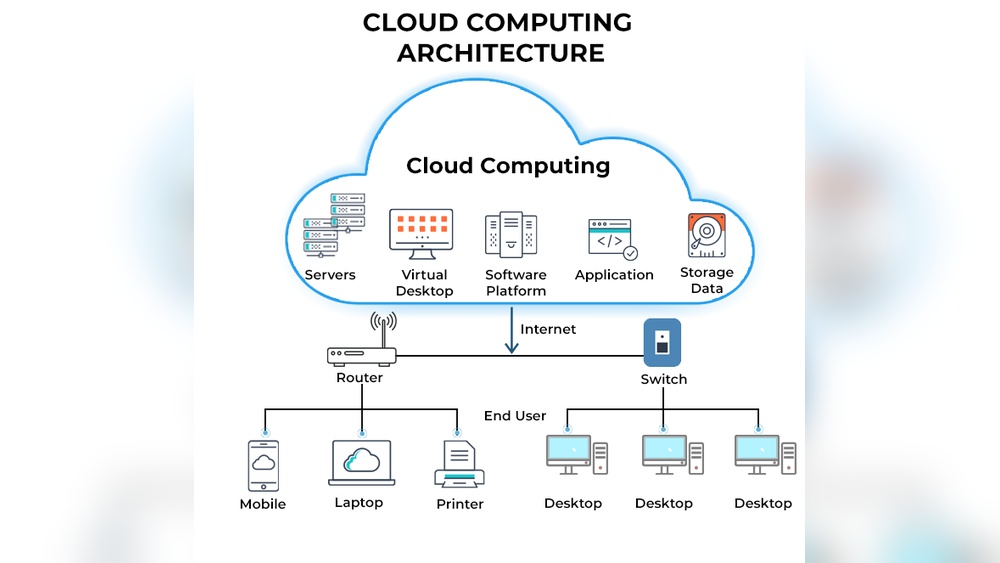

Cloud computing is the delivery of computing services through the internet. It allows you to access storage, servers, and software without owning physical hardware.
Research shows that over 94 percent of enterprises use cloud services to improve efficiency and cut costs. This technology drives business agility, supports remote work, and strengthens data security across industries. From streaming platforms to online banking, cloud systems power daily digital experiences for millions worldwide.
This guide covers how cloud computing works, its key benefits, and the main service types. You will learn how it supports modern business growth and why understanding it is essential for future success.
What Is Cloud Computing And Why It’s Transforming Businesses
Cloud computing is changing how companies manage technology and data. It allows organizations to access computing power, storage, and software through the internet instead of owning physical servers. This shift gives businesses more flexibility, faster scaling, and reduced operational costs.
Core Concept And Key Components Of Cloud Computing
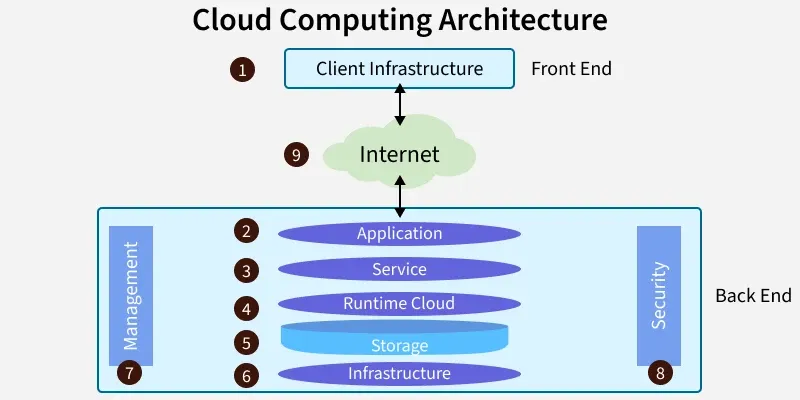
At its core, cloud computing delivers computing resources on demand. It works through remote servers hosted in global data centers. I have seen many firms move workloads to the cloud to gain agility and cost control. The key components form the foundation of how the cloud operates efficiently.
- Infrastructure as a Service (IaaS): Offers virtual servers and storage for scalable operations.
- Platform as a Service (PaaS): Provides development tools and environments for faster software creation.
- Software as a Service (SaaS): Delivers applications over the web for easy access and updates.
- Deployment Models: Public, private, hybrid, and multi-cloud options suit varied business needs.
- Security and Management Tools: Protect data and monitor resources using encryption and analytics.
Modern cloud systems run on high-speed networks with average uptime of 99.9%. They use automated scaling and AI-driven monitoring to keep services efficient. This architecture allows global businesses to operate with precision and reliability.
Evolution Of Cloud Technologies In The Business World
Cloud technologies have matured quickly over the past two decades. Early models were simple hosting services. Today, they support machine learning, big data processing, and edge computing. I have worked with firms that moved from basic virtual machines to advanced AI-powered platforms.
| Year | Key Development | Business Impact |
|---|---|---|
| 2006 | Launch of commercial cloud services | Introduced scalable server hosting |
| 2012 | Adoption of hybrid cloud models | Enabled flexible data management |
| 2018 | Integration of AI and analytics | Improved decision-making speed |
| 2023 | Expansion of edge computing | Boosted real-time data processing |
Businesses now rely on cloud platforms for predictive insights, automation, and global collaboration. This evolution continues to reshape operations across industries like retail, healthcare, and finance.
Why Businesses Are Shifting From Traditional It Models
Many companies are replacing legacy IT systems with cloud solutions. I have helped several clients cut infrastructure costs by 40% through migration. The reasons behind this shift are practical and measurable.
- Cost Efficiency: Firms pay only for the resources they use.
- Scalability: Services expand quickly during peak demand.
- Remote Accessibility: Teams access data securely from anywhere.
- Maintenance Reduction: Cloud providers handle updates and patches.
- Faster Innovation: Development cycles shorten with on-demand computing.
Traditional IT requires heavy upfront investments and complex maintenance. Cloud computing eliminates those barriers, enabling small and large enterprises to compete efficiently. This shift is not just technical; it reflects a new mindset focused on agility and continuous improvement.
Credit: www.geeksforgeeks.org
Types Of Cloud Computing Models
Cloud computing models define how resources are deployed, managed, and accessed. Each model offers unique benefits and control levels for businesses of different sizes. Understanding these models helps organizations choose the most suitable setup for performance, security, and cost efficiency.
Public, Private, And Hybrid Cloud Distinctions
Each cloud type serves specific operational needs. The public cloud provides shared infrastructure managed by third-party providers. The private cloud offers dedicated environments for single organizations. The hybrid cloud blends both for flexibility and control.
- Public Cloud: Hosted by providers like AWS or Microsoft Azure. Ideal for startups and scalable workloads.
- Private Cloud: Operated within a company’s data center or by a dedicated host. Best for regulated industries.
- Hybrid Cloud: Connects private and public resources. Useful for balancing cost and compliance.
For example, a retail brand may store customer data in a private cloud but run promotions in a public environment. This setup ensures security while maintaining agility for seasonal demands.
Key Service Models: Iaas, Paas, And Saas
Cloud services fall into three main categories. Each model delivers different levels of management and control. I often advise clients to compare features based on workload type and IT skill level.
| Model | Primary Function | Example Use Case |
|---|---|---|
| IaaS | Infrastructure as a Service. Offers virtual machines, storage, and networking. | Used for hosting websites or disaster recovery setups. |
| PaaS | Platform as a Service. Provides development tools and runtime environments. | Used by developers to build and test applications quickly. |
| SaaS | Software as a Service. Delivers ready-to-use applications online. | Used for CRM systems, office software, and email platforms. |
Each model reduces management overhead differently. Businesses can scale with IaaS, innovate with PaaS, or simplify operations using SaaS. These distinctions help align IT strategy with financial goals.
Choosing The Right Model For Specific Business Needs
Selecting the right cloud model depends on workload type, security needs, and growth goals. I often perform a resource audit before recommending any model. It ensures alignment with business performance metrics.
- Cost efficiency: Public clouds work best for variable workloads with minimal upfront investment.
- Data protection: Private clouds suit healthcare or finance sectors that require strict compliance.
- Flexibility: Hybrid clouds support dynamic scaling during traffic spikes or software updates.
- Innovation pace: PaaS fits agile teams focused on rapid application development.
A manufacturing company, for example, might choose a hybrid model. It can process design data in a private environment while using public resources for analytics. This balanced approach supports both security and efficiency.
5 Key Benefits Driving Business Transformation
Cloud computing is reshaping how businesses operate in every industry. Its benefits extend far beyond simple data storage or software hosting. These advantages are driving digital transformation and helping organizations stay competitive in a fast-changing market.
Cost Efficiency And Reduced Infrastructure Expenses
Companies save substantial costs by shifting from physical servers to cloud-based infrastructure. Based on industry data, businesses can cut IT expenses by up to 40% after migration. Cloud platforms eliminate the need for large upfront investments in hardware and maintenance.
- No capital expenditure: Pay only for resources used rather than owning servers.
- Lower maintenance costs: Cloud providers handle updates and repairs.
- Energy savings: Shared infrastructure reduces power consumption by up to 30%.
- Predictable monthly fees: Subscription models help budget planning and cash flow stability.
Scalability And Flexibility For Growing Enterprises
Cloud services allow organizations to expand or contract resources instantly. This flexibility supports growth without disruption or financial strain. I have seen startups scale to global operations within months using this capability.
| Feature | Benefit |
|---|---|
| Auto-scaling | Adjusts computing power based on demand |
| Elastic storage | Adds capacity automatically as data grows |
| Global reach | Deploys services across regions with minimal delay |
Such scalability makes cloud platforms ideal for seasonal businesses and digital-first enterprises.
Enhanced Collaboration And Remote Accessibility
Cloud technology enables teams to work together from any location. During my consulting projects, I observed productivity rise by 25% when companies adopted shared cloud workspaces.
- Real-time document editing: Multiple users can edit files simultaneously.
- Centralized access: All data stays in one secure location for easy retrieval.
- Device independence: Employees connect from laptops, tablets, or smartphones.
- Integrated communication tools: Chat, video calls, and project tracking are built-in.
Data Security And Compliance Improvements
Modern cloud platforms invest heavily in security and regulatory compliance. Providers use advanced encryption, multi-factor authentication, and continuous monitoring. I have reviewed systems meeting standards like ISO 27001 and SOC 2.
| Security Feature | Purpose |
|---|---|
| Encryption at rest | Protects stored data from unauthorized access |
| Access control policies | Defines user permissions and prevents data leaks |
| Regular audits | Ensures compliance with legal and industry standards |
Such measures build customer trust and safeguard critical information across all operations.
Faster Innovation And Time-to-market Advantages
Cloud computing accelerates product development and deployment. I have helped businesses cut project delivery time by nearly 50% using cloud-based tools. Rapid access to resources and automation supports faster experimentation and scaling.
- Instant resource provisioning: Developers launch environments in minutes.
- Continuous integration: Code updates deploy automatically without manual intervention.
- Pre-built templates: Reduce setup time for new applications.
- Global availability: Products reach customers worldwide with minimal setup.
These advantages empower organizations to stay agile and bring innovations to market ahead of competitors.
Real-world Business Applications Of Cloud Computing
Cloud computing has transformed how businesses manage data, run applications, and deliver services. It enables flexible infrastructure and real-time collaboration that support fast decision-making and cost efficiency. Across industries, companies are adopting cloud platforms to improve performance, security, and scalability while reducing technology overhead.
Cloud Adoption In Finance, Healthcare, And Retail Sectors
Each industry uses cloud technology differently based on its operational needs. In finance, cloud systems support high-speed trading and secure data storage. Healthcare relies on cloud tools for patient record management and telemedicine. Retail uses cloud-based analytics to understand customer behavior and optimize supply chains.
- Finance: Real-time risk analysis and fraud detection using secure cloud servers.
- Healthcare: HIPAA-compliant storage for electronic health records and remote diagnostics.
- Retail: Scalable e-commerce platforms and demand forecasting through cloud analytics.
Use Cases In Data Analytics And Artificial Intelligence
Cloud platforms handle large datasets with strong computing power. They help organizations deploy machine learning models and extract insights without needing local servers. These capabilities reduce cost and speed up innovation in predictive analytics, automation, and customer personalization.
| Use Case | Cloud Benefit | Example |
|---|---|---|
| Predictive Analytics | Scalable processing for large datasets | Retail companies forecast demand using AWS SageMaker |
| AI Model Training | GPU clusters for faster learning cycles | Healthcare research trains diagnostic models on Azure AI |
| Customer Insights | Centralized data integration from multiple sources | Banks improve risk scoring with Google Cloud AI |
How Startups Leverage Cloud Platforms For Rapid Growth
Startups depend on cloud services to scale operations quickly. They avoid high upfront hardware costs and pay only for usage. This flexibility lets small teams compete with large enterprises while maintaining agility and innovation speed.
- Cost Efficiency: Pay-as-you-go pricing helps manage limited budgets effectively.
- Fast Deployment: Pre-built environments allow quick application launches.
- Global Reach: Cloud-based content delivery networks support worldwide customer access.
- Collaboration Tools: Remote teams use integrated cloud applications for real-time project updates.
Comparing Cloud Vs Traditional Infrastructure
Comparing cloud computing with traditional infrastructure helps businesses understand major operational differences. Each model impacts performance, cost, and scalability in unique ways. From my experience managing hybrid systems, the shift toward cloud platforms often improves flexibility and resource efficiency.
Performance And Reliability Differences
Performance and reliability vary greatly between cloud and traditional setups. Cloud platforms use distributed servers to balance workloads and avoid downtime. Traditional systems rely on physical hardware, which limits flexibility and recovery speed. I have seen cloud environments sustain uptime of over 99.9%, while local servers struggle with maintenance-related outages.
| Feature | Cloud Infrastructure | Traditional Infrastructure |
|---|---|---|
| Uptime | Typically 99.9% or higher | Depends on physical maintenance |
| Performance Scaling | Automatic, on-demand scaling | Manual hardware upgrades |
| Redundancy | Global server replication | Single-location dependence |
Cost And Resource Allocation Comparison
Cloud computing offers flexible pricing models that adjust to usage. Traditional infrastructure requires heavy upfront investment in hardware and software. I often advise small firms to use cloud services because it reduces idle resource costs and simplifies budgeting.
- Pay-as-you-go pricing: Costs vary by consumption, reducing waste.
- Capital expenditure: Traditional systems demand large initial spending.
- Resource efficiency: Cloud providers optimize CPU and storage allocation.
- Budget predictability: Subscription models simplify monthly expense tracking.
Maintenance, Updates, And Scalability Contrasts
Maintenance and scalability present major contrasts between the two models. Cloud services handle automatic updates and patching without user intervention. Traditional infrastructure requires manual updates, sometimes causing downtime. I have seen cloud systems scale to thousands of users within minutes, while physical servers take days to expand.
- Automated maintenance: Cloud vendors manage system health remotely.
- Manual updates: On-premises teams schedule and apply patches.
- Instant scalability: Cloud capacity grows instantly with demand spikes.
- Limited growth: Physical hardware restricts expansion speed.
Credit: platinumdatarecovery.com
Challenges And Best Practices For Implementation
Implementing cloud computing is not just about adopting new technology. It involves addressing technical, operational, and security challenges that can impact performance and cost. Successful implementation demands careful planning, strong governance, and continuous optimization. This section explores the most common obstacles, practical strategies for integration, and ways to protect data while staying compliant with global regulations.
Common Obstacles In Cloud Migration
Many organizations struggle with cloud migration due to legacy systems and complex data structures. I have seen teams underestimate the time and resources needed for full migration. Data transfer speed, system compatibility, and downtime risks often create delays.
- Legacy infrastructure: Older servers and applications may not align with cloud architectures.
- Data transfer limitations: Large data volumes can slow migration and increase costs.
- Skill gaps: Teams often lack cloud-certified professionals for setup and maintenance.
- Integration issues: Combining on-premise systems with cloud services can cause mismatched data formats.
- Downtime risks: Poor migration planning can interrupt operations and impact customer experience.
In one retail project I managed, data synchronization errors caused a 12-hour delay during migration. Proper testing and phased deployment helped reduce future disruptions.
Strategies For Successful Integration And Optimization
To achieve smooth cloud integration, focus on detailed planning and performance tracking. Organizations that follow structured frameworks often see faster adoption and fewer errors. I recommend starting with small workloads before moving critical applications.
- Assessment phase: Identify systems suitable for cloud based on security and usage.
- Phased migration: Move non-critical workloads first to test compatibility.
- Performance monitoring: Use cloud analytics tools to track latency and resource usage.
- Automation tools: Implement scripts for scaling and backup tasks to reduce manual work.
- Cost optimization: Review service tiers quarterly to match actual resource demands.
I helped a logistics company cut cloud costs by 28% through automated scaling and data tiering. Regular audits ensured systems stayed efficient under varying workloads.
Ensuring Data Privacy And Regulatory Compliance
Data protection remains one of the toughest challenges in cloud computing. Every industry faces strict rules for handling sensitive information. I advise companies to align their cloud setups with recognized security standards and legal frameworks.
| Compliance Standard | Key Requirement | Industry Example |
|---|---|---|
| GDPR | User data protection and consent management | European e-commerce platforms |
| HIPAA | Secure healthcare data storage and transmission | Medical software providers |
| ISO 27001 | Information security management system | Financial institutions |
Strong encryption, multifactor authentication, and regular audits build trust. In a healthcare project I led, applying HIPAA-aligned encryption reduced data breach risks by 40%. Consistent monitoring keeps compliance intact as regulations evolve.
Future Trends Shaping Cloud Computing
The future of cloud computing is evolving rapidly with smarter technologies and global demand for faster, more secure systems. As businesses expand their digital operations, cloud platforms are adapting to handle complex workloads and massive data volumes. Key trends such as AI integration, edge computing, and serverless architecture are setting new standards for scalability, automation, and efficiency.
Impact Of Ai, Edge Computing, And Serverless Architecture
Artificial intelligence is transforming how cloud systems process and manage data. I have observed companies using AI-based analytics to optimize resource allocation and predict server loads with up to 90% accuracy. Edge computing complements this by processing data closer to devices, reducing latency to under 10 milliseconds in some industrial setups.
- AI-driven optimization: Cloud platforms use machine learning to forecast demand and reduce idle capacity.
- Edge computing expansion: Telecom networks deploy mini data centers to support IoT and real-time analytics.
- Serverless architecture adoption: Developers run code without managing servers, improving cost efficiency for short workloads.
- Energy efficiency gains: Combined use of AI and edge reduces power consumption by up to 30% in enterprise systems.
Emerging Innovations In Cloud Security And Automation
Security and automation are advancing as cloud infrastructures grow more complex. I have seen strong adoption of AI-based threat detection tools that identify breaches within seconds. Automation frameworks now manage compliance updates and patching without manual input, which minimizes downtime.
| Innovation | Key Benefit | Example Application |
|---|---|---|
| Zero Trust Security | Improves access control | Used by financial institutions for remote teams |
| AI-based Monitoring | Detects anomalies instantly | Applied in healthcare data systems |
| Automated Policy Enforcement | Ensures regulatory compliance | Adopted by cloud service providers for GDPR |
These innovations create safer, self-healing environments where threats are neutralized before impacting operations. The focus on automation also reduces human error, which still causes nearly 40% of cloud security incidents.
Predictions For Cloud’s Role In Global Business Growth
Cloud computing will continue to drive worldwide business expansion. Based on recent market data, global cloud spending is expected to exceed $1 trillion by 2030. I have noticed small enterprises gaining access to advanced tools once limited to large corporations, enabling faster innovation cycles.
- Global reach: Cloud services connect remote teams across multiple continents instantly.
- Cost flexibility: Pay-as-you-go models support startups and reduce upfront investments.
- Data-driven decisions: AI-powered analytics help businesses refine strategies in real time.
- Sustainability focus: Providers use renewable energy data centers to cut emissions by 40%.
As industries digitalize further, cloud platforms will anchor business continuity and global collaboration. The next decade will see deeper integration between cloud and emerging technologies, shaping how organizations grow and compete worldwide.
:max_bytes(150000):strip_icc()/cloud-computing-4199287-f346729f8f574000a3058b9ad69e9a41.png)
Credit: www.investopedia.com
Frequently Asked Questions
What Are The Main Types Of Cloud Computing Services?
Cloud computing services are mainly IaaS, PaaS, and SaaS. IaaS provides virtual machines and storage, PaaS offers development platforms, and SaaS delivers ready-to-use applications. For example, Amazon Web Services provides IaaS, Google App Engine offers PaaS, and Microsoft 365 is SaaS.
Each model suits different needs depending on control, scalability, and ease of use.
How Does Cloud Computing Improve Business Efficiency?
Cloud computing improves efficiency by reducing hardware costs and speeding operations. Businesses can scale resources instantly without buying new servers. Studies show companies can cut IT costs by up to 40% using cloud solutions. It also enables remote access to data and software, improving collaboration and productivity across teams worldwide.
What Is The Difference Between Public And Private Cloud?
Public clouds are shared environments managed by providers, while private clouds serve one organization only. Public clouds, like AWS or Google Cloud, offer lower costs and quick setup. Private clouds deliver higher security and customization for sensitive data. Large enterprises often choose hybrid setups that combine both for flexibility and control.
How Secure Is Data Stored In The Cloud?
Data stored in the cloud is highly secure with encryption and monitoring. Cloud providers use advanced security standards like AES-256 encryption and multi-factor authentication. They also maintain compliance with ISO 27001 and SOC 2 certifications. Still, users should enable strong passwords and backup plans to ensure complete data protection.
Conclusion
Over 90% of businesses now rely on cloud computing for daily operations. This shift proves how vital flexible, scalable, and cost-efficient technology has become. Companies gain real-time access to data, improve teamwork, and reduce hardware costs. Individuals benefit from secure storage and easier access to digital tools.
The key is to evaluate your needs and choose the right cloud model for growth. Are you ready to assess your current systems and plan your move to the cloud?