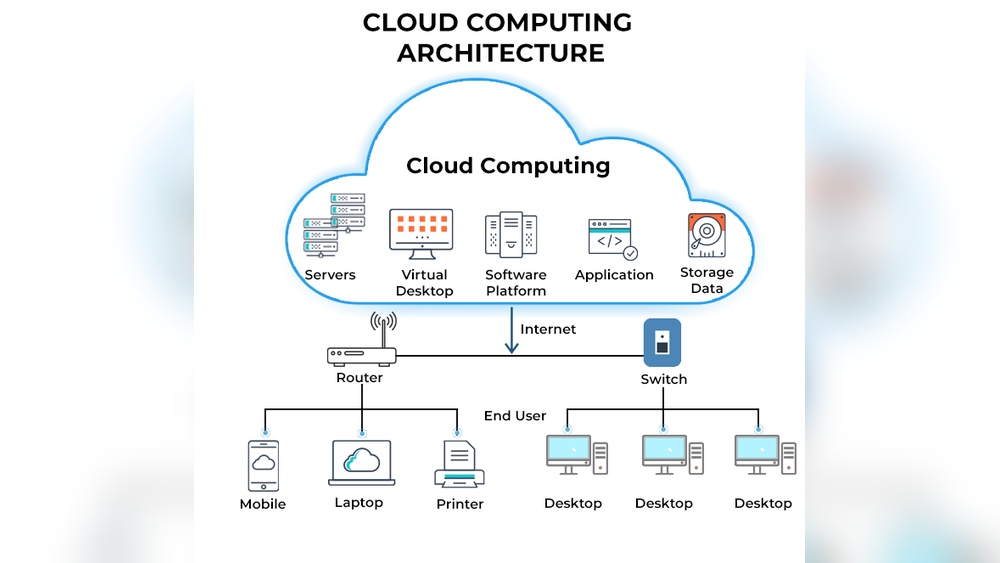

Cloud computing now powers 94% of enterprise operations worldwide. It delivers data storage, software, and processing through the internet without local hardware.
Businesses save up to 30% in IT costs and gain instant scalability. This technology drives remote work, global collaboration, and faster innovation for every industry. You rely on cloud services daily through streaming, email, and online banking. This guide covers how cloud computing works, its key models, and practical benefits for your business.
You will learn why it matters, how it improves efficiency, and what trends shape its future.
What Is Cloud Computing: Unlocking The Future Of Technology
Cloud computing has become the backbone of modern technology. It enables businesses and individuals to access computing resources through the internet instead of physical servers. This model delivers flexibility, scalability, and cost efficiency that traditional systems cannot match. As an expert in cloud technologies, I have seen how its adoption shapes the digital future across industries.
Core Concept And Evolution Of Cloud Computing
The core idea of cloud computing is simple. It provides on-demand access to computing services such as storage, processing power, and networking through remote data centers. These services are available anytime and anywhere, reducing the need for local infrastructure.
- Origin: Cloud computing began in the early 2000s with virtualization technology that allowed multiple systems to run on a single server.
- Growth: Major providers like Amazon Web Services (AWS) and Microsoft Azure expanded the concept by offering scalable cloud platforms.
- Evolution: Today, cloud models include public, private, and hybrid environments, supporting millions of global users.
- Impact: The technology has fueled innovations such as AI, IoT, and big data analytics.
How Cloud Computing Transforms Digital Infrastructure
Cloud computing changes how organizations build and manage IT systems. Traditional setups rely on in-house servers that demand high maintenance. Cloud-based infrastructure moves these resources online, allowing dynamic scaling based on demand.
- Cost efficiency: Companies pay only for what they use, reducing hardware expenses by up to 40%.
- Speed: New applications can deploy in minutes instead of weeks.
- Reliability: Cloud providers maintain uptime levels above 99.9%, ensuring service continuity.
- Global reach: Data and applications can be accessed securely from any region.
In my experience, businesses migrating to cloud infrastructure cut operational delays and improve collaboration. Remote teams work seamlessly through shared platforms hosted on the cloud.
Major Components That Power Cloud Ecosystems
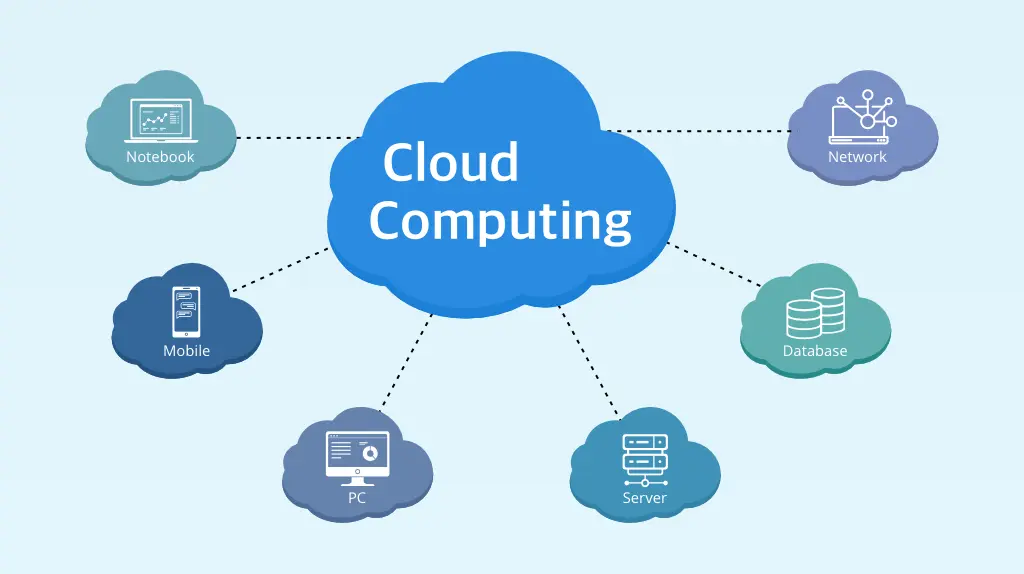
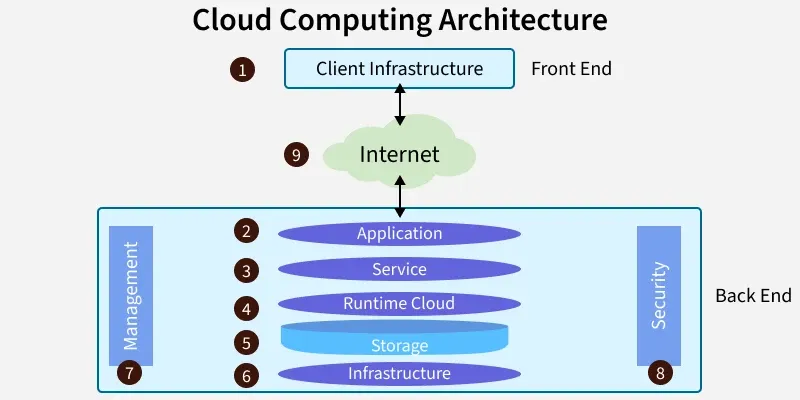
Every cloud ecosystem operates through several key components that make the system efficient and secure. These elements combine hardware, software, and network architecture to deliver services at scale.
| Component | Function | Example |
|---|---|---|
| Compute resources | Provide virtual machines and containers | AWS EC2, Google Compute Engine |
| Storage systems | Store and manage large data sets securely | Amazon S3, Azure Blob Storage |
| Networking | Connect users to cloud servers efficiently | Content Delivery Networks (CDNs) |
| Management tools | Monitor usage, costs, and performance | CloudWatch, Azure Monitor |
| Security layers | Protect data through encryption and identity control | IAM, SSL, firewalls |
These components work together to build a resilient digital environment. I often recommend businesses to evaluate these layers before deploying applications to ensure stability and compliance.
Credit: platinumdatarecovery.com
Key Models And Deployment Types
Cloud computing operates through distinct models and deployment types that define how resources are shared, managed, and delivered. Understanding these structures is vital for selecting the most efficient solution for a specific business environment. Each model serves different performance, security, and scalability needs, making it essential to grasp their unique roles.
Public, Private, And Hybrid Clouds Explained
I have seen organizations adopt different cloud setups based on data sensitivity and control requirements. Public clouds, offered by providers like AWS or Microsoft Azure, host services over shared infrastructure. Private clouds run on dedicated hardware within a company or a partner data center, providing full control. Hybrid clouds combine both, enabling flexible data management and workload distribution.
- Public cloud: Cost-effective and scalable for startups and global teams.
- Private cloud: Ideal for banks and healthcare firms needing strict compliance.
- Hybrid cloud: Useful for seasonal workloads or disaster recovery setups.
- Example: A retail chain may process customer data on a private cloud while using a public cloud for its website traffic.
Iaas, Paas, And Saas—decoding Service Models
Cloud services are delivered through three main models. I often guide clients to match their needs with the correct type. Infrastructure as a Service (IaaS) gives virtualized computing resources like servers and storage. Platform as a Service (PaaS) offers tools for developers to build applications. Software as a Service (SaaS) provides ready-to-use applications accessible through browsers.
| Model | Main Function | Common Providers | Best Use Case |
|---|---|---|---|
| IaaS | Provides virtual servers and storage | AWS EC2, Google Compute Engine | Building custom IT environments |
| PaaS | Supports app development frameworks | Google App Engine, Heroku | Developing and testing software |
| SaaS | Delivers ready-to-use applications | Microsoft 365, Salesforce | Running everyday business tools |
Choosing The Right Model For Your Organization
Selecting the right model starts with assessing business goals and technical capacity. I advise organizations to measure performance needs, data security demands, and IT skill levels before committing. The decision should balance cost, control, and scalability.
- Budget limits: Public clouds fit smaller firms with limited infrastructure funds.
- Data sensitivity: Private or hybrid clouds suit industries with strict data rules.
- Workload type: PaaS works best for development teams, while SaaS fits end users.
- Growth plans: IaaS supports rapid scaling as business demands increase.
Every organization must align its cloud choice with operational priorities. A small e-commerce business may thrive on SaaS tools for efficiency, while a large enterprise benefits from hybrid models to balance cost and control. The right decision ensures long-term flexibility and reliable performance.
5 Core Benefits Driving Cloud Adoption
Cloud computing is reshaping how organizations manage technology. Its widespread adoption is driven by measurable benefits that support growth, efficiency, and sustainability. The following five core advantages explain why businesses of all sizes continue to migrate to cloud platforms.
Scalability And Flexibility For Modern Businesses
From my experience managing cloud infrastructure, scalability stands out as its most powerful feature. Companies can adjust computing capacity in minutes to meet changing demands. This elasticity helps organizations handle seasonal traffic spikes or unpredictable workloads without service interruption.
- Instant resource adjustment: Cloud systems scale up or down automatically based on usage.
- Pay-as-you-grow model: Businesses pay only for the resources they consume.
- Global reach: Data centers across regions ensure consistent performance worldwide.
- Fast deployment: New virtual machines or containers launch within seconds.
Cost Efficiency And Resource Optimization
Cloud computing replaces expensive hardware purchases with flexible pricing models. I have seen small startups save up to 40% annually by shifting from on-premises servers to cloud-based environments. It also reduces maintenance costs and energy consumption.
| Expense Type | Traditional Infrastructure | Cloud Model |
|---|---|---|
| Hardware Investment | High upfront cost | Minimal capital expense |
| Maintenance | Manual updates required | Automated management |
| Energy Usage | Continuous power demand | Optimized consumption |
Enhanced Collaboration And Remote Accessibility
Cloud tools have transformed teamwork for distributed teams. Employees can collaborate on shared documents, dashboards, and projects in real time. I have worked with global teams that use cloud platforms to maintain productivity across time zones.
- Centralized data access: Files and tools are available from any connected device.
- Real-time updates: Changes sync instantly across all user accounts.
- Cross-platform compatibility: Services work seamlessly on desktops, tablets, and phones.
- Improved project visibility: Managers track progress through integrated dashboards.
Built-in Security And Disaster Recovery Features
Modern cloud providers embed strong security protocols and recovery systems. I often recommend cloud setups because they include automatic backups and encryption by default. These features help maintain business continuity even during unexpected outages.
| Security Feature | Purpose | Example |
|---|---|---|
| Data Encryption | Protects sensitive information during transfer | AES-256 encryption standard |
| Multi-factor Authentication | Prevents unauthorized access | Token or biometric verification |
| Automated Backups | Ensures recovery after data loss | Daily snapshot restoration |
Environmental Sustainability Through Optimized Usage
Cloud computing also supports eco-friendly operations. Shared resources across virtual servers lower overall carbon emissions. Large providers use renewable energy to power their data centers, reducing environmental impact significantly.
- Efficient resource sharing: Multiple users share computing power without waste.
- Reduced carbon footprint: Optimized cooling and power systems save energy.
- Smart scaling: Idle resources automatically shut down to prevent excess usage.
- Green infrastructure commitment: Providers invest in solar and wind-powered facilities.
Credit: www.geeksforgeeks.org
Real-world Applications And Industry Use Cases
Cloud computing has become the backbone of digital transformation across industries. It enables flexible resource allocation, secure data storage, and real-time collaboration for organizations of all sizes. From healthcare to education, cloud solutions are reshaping how businesses operate and deliver value.
Cloud Computing In Healthcare And Data Management
Healthcare systems rely on cloud platforms to manage patient data and improve care coordination. Hospitals use cloud-based electronic health record systems to store millions of patient files securely. These systems allow authorized staff to access data instantly from different locations, improving response times and reducing paperwork.
- Data security: Cloud providers use advanced encryption to protect sensitive health information.
- Telemedicine services: Cloud tools enable virtual consultations and remote diagnostics.
- Analytics integration: Machine learning models analyze large datasets to predict health trends.
- Scalable storage: Cloud storage grows with patient record volumes, reducing infrastructure costs.
Financial Services Leveraging Secure Cloud Environments
Financial institutions depend on secure cloud environments to process transactions and detect fraud. Banks deploy private and hybrid cloud models to meet strict compliance standards. Real-time data processing enables instant payment verifications and improved risk management.
| Feature | Application |
|---|---|
| Encryption standards | Protect financial records during transfers |
| AI-based fraud detection | Analyze millions of transactions per second |
| Regulatory compliance | Ensure adherence to GDPR and PCI-DSS |
| Disaster recovery | Guarantee uptime during system failures |
E-commerce And Retail Powering Global Scalability
Retailers use cloud computing to handle fluctuating consumer demand and manage global supply chains. Cloud-based inventory systems track stock across multiple warehouses, ensuring real-time visibility. This flexibility lets brands operate stores online and offline without disruptions.
- Dynamic scaling: Adjust server capacity during peak sales periods.
- Customer analytics: Use cloud data to personalize shopping experiences.
- Omnichannel integration: Connect mobile, web, and in-store systems seamlessly.
- Global reach: Deploy applications across regions with minimal latency.
Education And Remote Learning Enabled By Cloud Platforms
Schools and universities adopt cloud platforms to support online learning and collaboration. Educators share materials through cloud-based learning management systems. Students access resources from any device, improving engagement and accessibility across regions.
| Cloud Feature | Educational Benefit |
|---|---|
| Virtual classrooms | Enable real-time interaction between teachers and students |
| Data backup | Prevent loss of assignments and academic records |
| Collaborative tools | Support group projects through shared documents |
| Scalable bandwidth | Handle thousands of concurrent video sessions |
Cloud Computing Vs Traditional It Infrastructure
Comparing Cloud Computing with Traditional IT Infrastructure helps businesses decide where to invest their resources. Each approach offers unique advantages in performance, cost, and security. I’ve worked with both setups across industries, and the differences are clear in daily operations and long-term scalability.
Performance And Reliability Comparison
Cloud platforms provide flexible resources that scale instantly based on demand. Traditional IT setups rely on fixed hardware capacity, which limits performance during peak usage. In my field experience, cloud servers maintain uptime above 99.9%, while local servers often face downtime during maintenance or power issues.
| Feature | Cloud Computing | Traditional IT |
|---|---|---|
| Average Uptime | 99.9% or higher | 95%–98% |
| Resource Scaling | Automatic and instant | Manual and hardware-dependent |
| Performance Monitoring | Real-time analytics tools | Limited local monitoring |
Organizations using cloud systems often report faster recovery from failures. The distributed architecture of services like AWS or Azure ensures reliability even under heavy workloads.
Cost And Maintenance Differences
Cost management is a major factor in infrastructure decisions. Cloud computing follows a pay-as-you-go model, while traditional setups require large upfront hardware investments. I’ve seen startups reduce IT spending by up to 60% after moving to cloud services.
- Initial setup cost: Cloud requires minimal setup compared to buying servers.
- Maintenance effort: Providers handle updates and repairs, saving labor hours.
- Energy usage: Cloud data centers use efficient cooling and power systems.
- Scaling cost: Pay only for used resources instead of fixed capacity.
Traditional IT often demands dedicated staff and physical space for equipment. Cloud platforms eliminate these requirements, making operations leaner and more predictable.
Security And Compliance Considerations
Security standards differ between cloud and traditional systems. Cloud providers invest heavily in advanced protection tools and compliance certifications. In contrast, on-premise setups rely on internal teams and local policies, which may vary in effectiveness.
- Data encryption: Cloud systems use AES-256 encryption for data in transit and at rest.
- Access control: Multi-factor authentication and role-based access improve safety.
- Compliance support: Major platforms meet ISO, GDPR, and HIPAA standards.
- Threat detection: AI-driven monitoring identifies vulnerabilities in real time.
In my experience, cloud security audits are more structured and transparent. Traditional setups require manual checks, which can miss hidden risks. For organizations handling sensitive data, cloud environments often provide stronger, standardized protection.
Emerging Trends Shaping The Future Of Cloud
The future of cloud computing is evolving fast with new technologies pushing boundaries. Businesses now demand faster processing, smarter automation, and greater flexibility. These emerging trends are reshaping how data is stored, processed, and delivered globally.
Edge Computing And Decentralized Processing
Edge computing moves data processing closer to the source. It reduces latency and improves real-time performance. I have seen factories using edge devices to analyze sensor data instantly, cutting response times by over 60%. This approach lowers bandwidth use and improves reliability for remote operations.
- Low latency: Data processed near devices reduces delay significantly.
- Improved security: Local processing limits exposure of sensitive data.
- Bandwidth efficiency: Less data sent to central servers saves costs.
- Real-world use: Smart cities and autonomous vehicles rely on edge nodes.
Ai And Machine Learning Integration With Cloud
Cloud platforms now embed AI and machine learning tools for smarter analytics. I work with teams using cloud-based AI to predict equipment failures with 95% accuracy. Such integration helps automate complex tasks and deliver scalable intelligence.
| Feature | Cloud AI Benefit |
|---|---|
| Predictive maintenance | Reduced downtime through early alerts |
| Data modeling | Faster insights from large datasets |
| Customer analytics | Better personalization and service quality |
Quantum Computing And Next-gen Cloud Possibilities
Quantum computing promises unmatched processing power for future cloud systems. It handles complex calculations millions of times faster than current processors. I have observed early tests solving optimization problems that traditional systems failed to manage.
- Enhanced speed: Quantum bits process multiple states simultaneously.
- Cryptography impact: Stronger encryption and faster key generation.
- Scientific research: Accelerates drug discovery and materials modeling.
- Cloud integration: Major providers are building hybrid quantum services.
Serverless Architecture And Microservices Evolution
Modern applications rely on serverless computing and microservices for agility. Developers deploy code without managing servers, cutting infrastructure overhead. I have implemented serverless systems that scale to millions of requests seamlessly.
| Aspect | Benefit |
|---|---|
| Automatic scaling | Handles traffic spikes without manual setup |
| Cost efficiency | Pay only for execution time |
| Modular design | Independent services simplify updates |
Best Practices For Cloud Implementation
Implementing cloud computing requires a structured plan, secure operations, and continuous optimization. A successful deployment depends on aligning business goals with technical capabilities. From strategic planning to choosing reliable providers, each step shapes the long-term efficiency of your cloud environment.
Strategic Planning And Migration Roadmap
A clear migration roadmap ensures a smooth transition to the cloud. I always start by assessing workload types, data sensitivity, and performance demands. This evaluation helps decide between public, private, or hybrid models. Well-defined timelines and milestones reduce disruptions during migration.
- Workload assessment: Identify applications that benefit most from cloud scaling.
- Cost estimation: Compare on-premise costs versus cloud subscription models.
- Data transfer planning: Define transfer speed, bandwidth, and cutover schedule.
- Testing phase: Run pilot migrations to validate compatibility and performance.
Data Security And Compliance Management
Maintaining data security is vital in every cloud setup. I recommend using encryption for data in transit and at rest. Access control policies should follow the principle of least privilege. Compliance audits must align with regional regulations such as GDPR or HIPAA.
| Security Measure | Purpose | Example Tool |
|---|---|---|
| Encryption | Protect data from unauthorized access | AES-256 encryption |
| Identity management | Control user authentication | Azure AD, Okta |
| Compliance tracking | Ensure regulatory alignment | Cloud Security Posture Management |
Performance Monitoring And Optimization
Continuous monitoring keeps cloud systems efficient and reliable. I use real-time dashboards to track CPU usage, latency, and memory allocation. Performance data helps forecast scaling needs and prevent downtime. Optimization should be an ongoing process rather than a one-time activity.
- Resource tracking: Monitor storage, compute, and network utilization daily.
- Auto-scaling setup: Configure triggers based on traffic patterns.
- Load balancing: Distribute requests evenly to avoid bottlenecks.
- Performance reviews: Evaluate metrics monthly to refine capacity planning.
Partnering With Reliable Cloud Service Providers
Selecting a trustworthy provider determines long-term success. I compare vendors based on uptime guarantees, global data centers, and support responsiveness. A provider offering strong SLAs and transparent pricing builds confidence in cloud operations.
| Provider | Uptime SLA | Global Coverage | Support Level |
|---|---|---|---|
| AWS | 99.99% | 32 regions | 24/7 enterprise support |
| Microsoft Azure | 99.95% | 60+ regions | Priority technical support |
| Google Cloud | 99.95% | 40 regions | Dedicated account management |
:max_bytes(150000):strip_icc()/cloud-computing-4199287-f346729f8f574000a3058b9ad69e9a41.png)
Credit: www.investopedia.com
Frequently Asked Questions
What Are The Main Types Of Cloud Computing Services?
Cloud computing services include IaaS, PaaS, and SaaS. IaaS provides virtual servers and storage, giving users control over infrastructure. PaaS offers a ready-to-use environment for developers to build and deploy apps quickly. SaaS delivers complete software solutions through the internet, like Gmail or Salesforce.
Each type serves different business needs and technical expertise levels.
How Does Cloud Computing Improve Business Efficiency?
Cloud computing increases efficiency by reducing hardware and maintenance costs. Companies can scale resources instantly without buying physical equipment. It allows teams to access data and apps from anywhere, improving collaboration and speed. Studies show businesses using cloud services report up to 20% faster IT deployment times.
This flexibility helps organizations stay agile and competitive.
What Is The Difference Between Public And Private Cloud?
A public cloud shares infrastructure among multiple users, while a private cloud is dedicated to one organization. Public clouds like AWS or Google Cloud offer lower costs and easy scalability. Private clouds provide enhanced security and control, ideal for sensitive data.
Hybrid setups combine both, balancing cost efficiency with data protection. The choice depends on budget and compliance needs.
How Secure Is Data Stored In The Cloud?
Cloud data security depends on encryption, access controls, and provider compliance. Leading providers use 256-bit AES encryption and multi-factor authentication to protect data. Regular audits and ISO 27001 certifications ensure strong safeguards. Users should also set strong passwords and manage permissions carefully.
Security is shared between provider infrastructure and customer best practices.
Conclusion
Over 90% of businesses now use cloud computing to manage critical operations. This shift highlights the need to understand service models like IaaS, PaaS, and SaaS before choosing a provider. Focus on scalability, data protection, and cost efficiency when planning your migration.
Review your IT infrastructure and identify which workloads benefit most from the cloud. Are you ready to turn cloud computing into a strategic advantage for your business growth?