

A reliable gaming monitor provides clear visuals and smooth performance for comfortable extended play.
Imagine rushing to finish a game before heading out, with only minutes to spare and intense action unfolding on screen. In moments like these, a responsive and clear display can make all the difference between victory and defeat.
Gaming monitors are designed to deliver smooth visuals and fast response times, ensuring you never miss a crucial detail. Next, we’ll share expert picks to help you find the perfect match for your gaming setup.
Expert Picks For Best Gaming Monitor
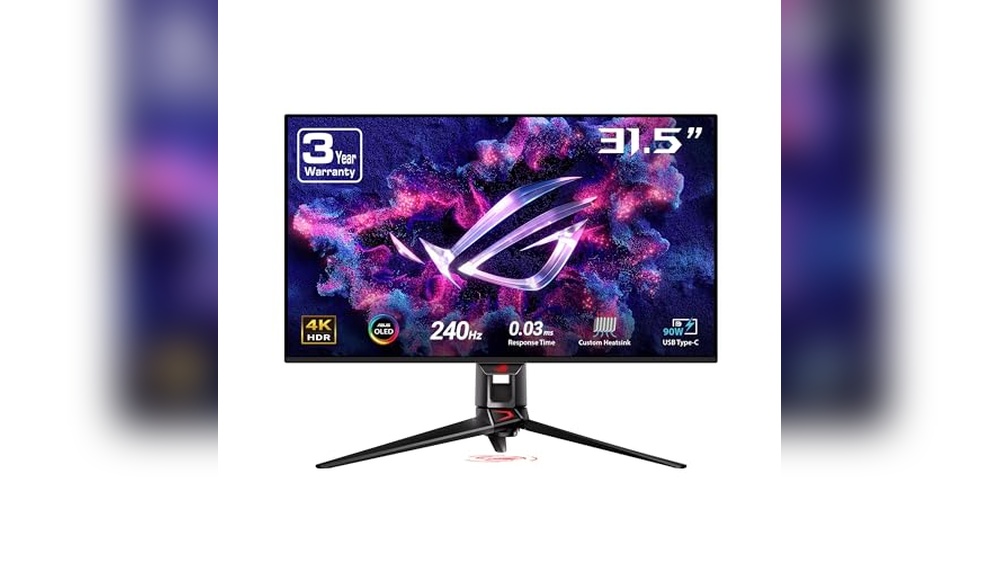
Asus Rog Swift 32” 4k Oled Monitor
Discover the ASUS ROG Swift 32” 4K OLED Monitor, a top choice for the Best Gaming Monitor category, delivering exceptional visuals and smooth gameplay for serious gamers.

The ASUS ROG Swift 32” 4K OLED Monitor combines a 32-inch 4K QD-OLED panel with an ultra-fast 240Hz refresh rate and 0.03ms response time, making it ideal for high-end gaming setups. It offers vivid colors with 99% DCI-P3 coverage, true 10-bit color depth, and HDR support, ensuring immersive and detailed visuals. Advanced features like a custom heatsink and graphene film help manage heat and reduce burn-in risk, enhancing its longevity.
In everyday use, this monitor delivers consistent brightness and color accuracy thanks to features like the uniform brightness setting and DisplayWidget Center for easy customization. Its reliable performance and reduced motion blur make it a pleasure to use for gaming sessions or general multimedia consumption, providing smooth and comfortable viewing without eye strain.
Pros:
- Exceptional 4K OLED display with QD technology for vivid colors
- Ultra-fast 240Hz refresh rate and 0.03ms response time for smooth gameplay
- Custom heatsink and graphene film improve heat management and durability
- High color accuracy with 99% DCI-P3 and true 10-bit support
- DisplayWidget Center simplifies settings adjustments and OLED care
- Supports G-SYNC for tear-free gaming
- USB-C port with 90W power delivery adds connectivity convenience
Cons:
- Relatively large size may not fit small desks
- Premium price point may be a barrier for casual gamers
- Limited HDR peak brightness compared to some LCD monitors
My Practical Opinion
This monitor is best suited for gamers and content creators who want high-fidelity visuals and fast response times without compromise. It’s easy to set up and tweak, even if you’re not a tech expert, thanks to user-friendly software controls. While the price is on the higher side, the investment pays off with excellent build quality and performance.
For those new to OLED gaming monitors, it’s reassuring to have features that reduce burn-in risk and maintain brightness uniformity, providing peace of mind during extended use. Personally, I appreciate how the combination of speed and color accuracy elevates the gaming experience without overwhelming complexity.
| Best for | Why |
|---|---|
| Competitive Gamers | Ultra-fast refresh rate and response time reduce input lag and motion blur |
| Content Creators | High color accuracy and HDR support enhance visual editing precision |
| Tech Enthusiasts | Advanced heat management and OLED care features ensure longevity |
| Users with USB-C Devices | 90W USB-C power delivery supports connectivity and charging needs |
Samsung Odyssey G55c 32-inch Curved Monitor
The Samsung Odyssey G55C stands out as a top choice for the Best Gaming Monitor category, thanks to its immersive 1000R curved display and smooth 165Hz refresh rate, offering a more engaging and responsive gaming experience.

The Samsung Odyssey G55C is a 32-inch curved gaming monitor designed to enhance your gaming sessions with sharp QHD resolution and a fast 1ms response time. It features AMD Radeon FreeSync technology to reduce screen tearing and HDR10 support for vivid color accuracy. This monitor is built to provide a comfortable viewing experience with eye care and glare-free technology, making it suitable for long hours of use.
In everyday use, the Odyssey G55C delivers consistent and smooth performance whether you’re gaming or watching movies. The 165Hz refresh rate keeps visuals fluid, and the curved screen helps reduce eye strain by wrapping around your field of vision naturally. Setting it up was straightforward, and its reliable build gives confidence in long-term durability.
Pros:
- Immersive 1000R curved display enhances gaming experience
- High 165Hz refresh rate ensures smooth visuals
- Fast 1ms MPRT response time reduces motion blur
- AMD Radeon FreeSync minimizes screen tearing
- HDR10 support provides vivid and vibrant colors
- Eye care and glare-free technology for comfortable viewing
- Sharp QHD resolution offers detailed visuals
Cons:
- Not a Prime-eligible item, which may affect shipping speed
- Relatively heavy at 11.5 pounds, less portable
- Some users may find the 1000R curve intense if new to curved screens
My Practical Opinion
This monitor suits gamers who want a balance of immersive visuals and smooth gameplay without overwhelming complexity. It’s well-suited for both beginners and experienced players who value eye comfort during extended sessions. After unboxing, I found the setup process simple, and the eye care features noticeably reduce strain over time.
If you’re new to curved monitors, take some time to adjust to the wrap-around view; it really adds to the experience once you get used to it. Overall, it’s a reliable choice that combines performance with comfort for everyday gaming.
| Best for | Why |
|---|---|
| Competitive Gamers | High refresh rate and low response time provide fast, responsive gameplay |
| Immersive Gameplay Enthusiasts | 1000R curved screen enhances peripheral vision and engagement |
| Long Gaming Sessions | Eye care and glare-free features reduce eye strain |
| Users Seeking Detailed Visuals | QHD resolution and HDR10 deliver sharp and vibrant imagery |
Sansui 32 Inch Curved Gaming Monitor
The SANSUI 32 Inch Curved Gaming Monitor stands out as a Best Gaming Monitor choice for gamers seeking smooth gameplay with a high refresh rate and immersive curved display.

The SANSUI 32 Inch Curved Gaming Monitor offers a 1500R curved screen with a 240Hz refresh rate and Full HD resolution, designed for smooth and immersive gaming experiences. It features a fast 1ms MPRT response time and includes FreeSync technology to reduce screen tearing. The monitor supports HDMI and DisplayPort 1.4 connections and comes with a DP cable included, making setup straightforward.
In daily use, this monitor delivers consistent performance with anti-flicker and low blue light features that help reduce eye strain during long sessions. The ergonomic design with tilt adjustment and VESA compatibility adds to comfort and flexibility. Its high color gamut and HDR technology produce vibrant visuals, making it suitable not only for gaming but also for entertainment and general computer tasks.
Pros:
- High 240Hz refresh rate for smooth gameplay
- Immersive 1500R curved screen enhances viewing experience
- Fast 1ms MPRT response time reduces motion blur
- Includes DP cable for easy connection
- FreeSync technology minimizes screen tearing
- Ergonomic tilt and VESA mount compatibility
- Wide color gamut with HDR support for vibrant visuals
Cons:
- No built-in speakers, requiring external audio solutions
- Full HD resolution may feel less sharp on 32-inch size for some users
My Practical Opinion
This monitor is a solid option for gamers who want a high refresh rate and immersive curvature without breaking the bank. It’s well suited for those who prioritize smooth motion and vibrant colors in a mid-range setup. The lack of speakers means you’ll need separate audio gear, but the included DP cable and ergonomic design make setup and daily use straightforward.
If you’re new to gaming monitors, this model offers an easy transition with reliable performance. For experienced gamers, its specs hold up well for most competitive and casual gaming scenarios. Personally, I appreciate the balance between performance and comfort this monitor provides for extended sessions.
| Best for | Why |
|---|---|
| Competitive Gamers | 240Hz refresh rate and 1ms response for minimal lag and smooth visuals |
| Casual Gamers | Comfortable curved screen with eye care features for longer play sessions |
| Budget-Conscious Buyers | Good balance of performance and price with included DP cable |
| Users Seeking Versatility | Supports multiple interfaces and ergonomic adjustments for various setups |
How To Choose Best Gaming Monitor For Your Needs
Choosing the best gaming monitor means finding the right balance between performance and comfort to enhance your gaming experience.
- What screen size fits best in your gaming setup?
- Do you prefer higher refresh rates for smoother gameplay?
- Is response time a critical factor for your gaming style?
- Do you need adaptive sync technology to reduce screen tearing?
- What resolution offers the clarity you desire without taxing your system?
- Are the monitor’s connectivity options compatible with your devices?
If you still have questions, the FAQs help.
Faqs Of Best Gaming Monitor
What is the ideal size for a gaming monitor?
A 24 to 27-inch monitor is generally optimal for most gaming setups, providing a balance between immersion and comfort. Larger screens can cause eye strain if viewed too closely, so choose a size that fits your desk and viewing distance.
How can I ensure safety while using a gaming monitor daily?
Maintain proper posture and keep the monitor at eye level to reduce neck and eye strain. Take regular breaks to prevent fatigue and avoid prolonged exposure to high brightness settings.
What are the best practices for cleaning a gaming monitor?
Use a microfiber cloth to gently wipe the screen and avoid harsh chemicals that can damage the display. Turn off the monitor before cleaning to prevent electrical issues and streaks.
How important is refresh rate for daily gaming use?
A higher refresh rate, such as 144Hz or above, provides smoother gameplay and reduces motion blur. This can enhance comfort during long gaming sessions by minimizing eye strain.
Can screen size affect safety during gaming?
Yes, overly large screens can cause you to move your head excessively, leading to neck discomfort. Choose a size that allows you to view the entire screen comfortably without excessive movement.
How do I set up my gaming monitor for daily use to avoid eye strain?
Adjust brightness and contrast to comfortable levels and enable blue light filters if available. Position the monitor about an arm’s length away and at eye level to maintain a natural viewing angle.
Final Verdict: Best Gaming Monitor For Most People
When selecting the best gaming monitor, consider the balance between refresh rate, resolution, and response time based on your gaming style and setup. Prioritizing what matters most to your experience will help narrow down the options effectively.
Ultimately, comfort and compatibility with your hardware play key roles in ensuring a satisfying gaming experience. Taking time to assess your needs rather than rushing into a choice leads to a more enjoyable and lasting investment.
Trust your preferences to guide the final decision.


