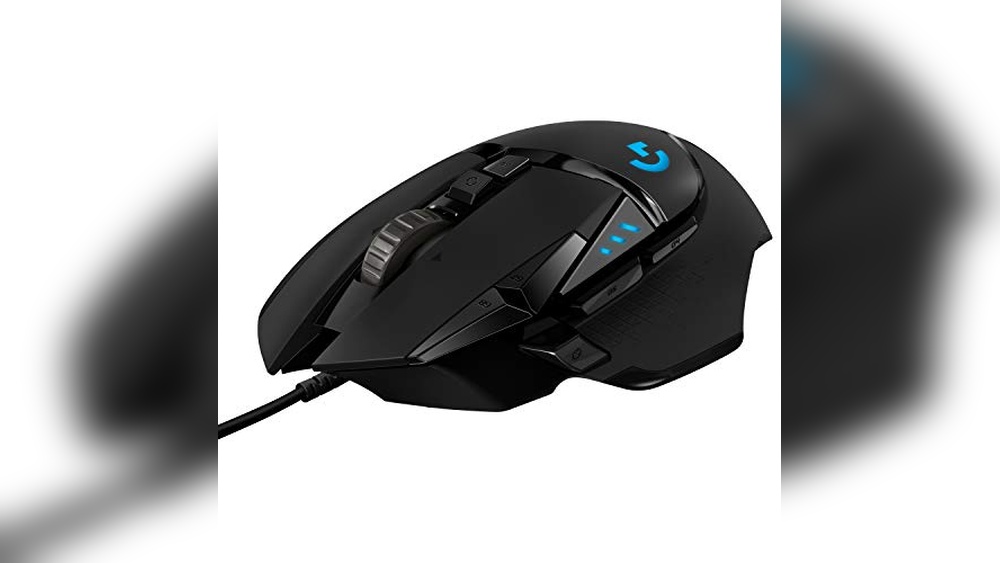

A reliable gaming mouse offers consistent precision and comfortable use for extended play sessions.
Imagine you’re in the middle of an intense online match, the clock is ticking, and every millisecond counts. In moments like these, having the right tool can make all the difference between victory and defeat.
A quality gaming mouse is designed to improve precision, speed, and comfort, helping you stay ahead under pressure. Up next, I’ll share some expert picks to elevate your gameplay.
What Expert Picks For Best Gaming Mouse
Logitech G502 Hero Wired Gaming Mouse
The Logitech G502 Hero Wired Gaming Mouse stands out as one of the best gaming mouse options for those seeking precise control and customization. Its high-performance Hero 25K sensor delivers exceptional tracking accuracy, while the adjustable weights and 11 programmable buttons offer personalized comfort and functionality for serious gamers.

This wired gaming mouse provides a solid balance between performance and customization. It features a Hero 25K sensor with zero smoothing or acceleration, ensuring smooth and responsive movement for competitive gaming. The adjustable weight system lets you fine-tune the mouse’s balance to your liking, making it versatile for different grip styles and preferences.
In everyday use, the Logitech G502 Hero feels reliable and comfortable. The mechanical switch button tensioning gives a satisfying click response, and the 11 customizable buttons make it easy to assign macros or shortcuts for productivity or gaming. Its RGB lighting adds a subtle personalization touch without being distracting, and the onboard memory keeps your settings intact across devices.
Pros:
- Highly precise Hero 25K sensor with up to 25,600 DPI
- Customizable weight system for personalized balance
- 11 programmable buttons for extensive control
- Mechanical switch button tensioning for crisp clicks
- Onboard memory to save profiles directly on the mouse
- Compatible with PC and Mac systems
- RGB lighting with Lightsync technology
- Solid build quality and comfortable design
Cons:
- Wired design might limit mobility for some users
- May feel bulky for those with smaller hands
- Software setup required for full customization
My Honest Take
This mouse is ideal for gamers who want a reliable and highly customizable tool without fuss. It’s beginner-friendly enough to start using right away but also offers advanced features that experienced players will appreciate. Once you set up your preferred profiles, the mouse performs consistently, giving you peace of mind during long gaming sessions.
For anyone considering an upgrade from a basic mouse, this model offers a nice step up in comfort and precision. My tip is to spend some time experimenting with the weight tuning and button assignments to find your perfect setup. It’s a dependable companion for both gaming and general computer use.
| Best for | Why |
|---|---|
| Competitive gamers | High-precision sensor and customizable buttons enhance gameplay |
| Users who prefer wired mice | Stable, lag-free connection ensures consistent performance |
| Gamers needing personalization | Adjustable weights and programmable buttons allow tailored setup |
| PC and Mac users | Cross-platform compatibility with saved profiles on board |
Razer Basilisk V3 Ergonomic Gaming Mouse
The Razer Basilisk V3 stands out as a reliable choice for anyone searching for the Best Gaming Mouse with an ergonomic design and customizable features. It offers a comfortable grip, precision controls, and vibrant lighting, making it a practical option for extended gaming sessions.

This gaming mouse from Razer features an iconic ergonomic design with a thumb rest, making it a favored choice among PC gamers. It includes 11 programmable buttons and a HyperScroll tilt wheel, allowing for quick access to essential controls and smooth navigation. The mouse also offers advanced RGB lighting customization across 11 zones, adding a personal touch to your setup.
In everyday use, the Basilisk V3 delivers consistent performance with its optical mouse switches that provide fast, precise clicks without misfires. The comfortable shape supports long gaming or work sessions without strain, and the customizable buttons make it easy to tailor the mouse for different games or tasks. Overall, it’s a dependable and comfortable tool for serious PC users.
Pros:
- Ergonomic design with supportive thumb rest
- 11 programmable buttons for versatile control
- HyperScroll tilt wheel enables fast and precise scrolling
- Customizable RGB lighting with 11 zones
- Fast optical switches with minimal misclicks
- Lightweight and compact dimensions for comfort
Cons:
- May be too large for users with smaller hands
- Advanced customization features might overwhelm beginners
- Price slightly higher than entry-level mice
My Practical Opinion
This mouse is well suited for gamers who spend long hours at the computer and want a device that combines comfort with precise control. Its programmable buttons and lighting customization give you flexibility without complicating daily use. I find it comfortable to hold over extended periods and appreciate the reliability of the optical switches. For those newer to gaming mice, taking time to explore the settings will pay off with a personalized experience.
Once set up, the Basilisk V3 offers peace of mind with its solid build and consistent performance. It’s a practical choice for anyone wanting a dependable mouse that adapts well to different gaming styles and general PC use.
| Best for | Why |
|---|---|
| Serious PC gamers | Ergonomic design and customizable buttons improve gameplay |
| Long gaming sessions | Comfortable thumb rest and lightweight design reduce hand fatigue |
| Users wanting customization | Extensive programmable buttons and RGB lighting options |
| Intermediate to advanced users | Features offer flexibility without being overly complex |
Razer Viper V3 Wireless Gaming Mouse
Your choice for the best gaming mouse with lightweight design and long-lasting battery life for serious esports play.

The Razer Viper V3 Wireless Gaming Mouse is a compact esports mouse designed for competitive players who value precision and speed. It features an ultra-lightweight 82-gram design and a Focus Pro 30K optical sensor that delivers exceptional accuracy and tracking on various surfaces, including glass. Its Gen-2 mechanical switches promise durability with a 60-million click lifespan, and the HyperSpeed wireless technology provides a low-latency, stable connection for uninterrupted gameplay.
In everyday use, this mouse feels reliable and comfortable. The centralized mass design makes swipes feel smooth and consistent, which is important for long gaming sessions. Battery life is impressive, offering up to 280 hours on a single AA battery, so I rarely worry about charging or replacements. The 8 programmable buttons allow for customization without complicating the setup, making it an easy choice whether you’re upgrading or just starting to explore wireless gaming mice.
Pros:
- Extremely lightweight for fast, precise movements
- Highly accurate Focus Pro 30K optical sensor with glass tracking
- Long battery life up to 280 hours on one AA battery
- Durable Gen-2 mechanical switches rated for 60 million clicks
- Stable and low-latency HyperSpeed wireless connection
- Eight programmable buttons for customization
- Comfortable centralized mass design for balanced handling
Cons:
- Single AA battery may not appeal to users preferring rechargeable mice
- Minimalistic design may lack additional grip textures some prefer
- Price might be high for casual gamers on a budget
My Practical Opinion
This mouse is ideal for gamers who want a lightweight and reliable wireless option without sacrificing performance. It suits both experienced esports players and those newer to competitive gaming looking for precision and comfort. After purchase, setup is straightforward, and the long battery life means less downtime during intense gaming periods. For peace of mind, the mechanical switches are durable enough to last through many hours of use, so you won’t have to worry about hardware failure anytime soon.
Personally, I appreciate how the mouse balances speed and control, making it feel natural during extended sessions. It’s not flashy but gets the job done consistently, which I find more valuable than gimmicks.
| Best for | Why |
|---|---|
| Competitive esports players | Lightweight design and precise sensor support fast, accurate gameplay |
| Wireless gaming enthusiasts | Low-latency HyperSpeed wireless ensures stable connections |
| Gamers seeking long battery life | Up to 280 hours on a single AA battery reduces interruptions |
| Users wanting customizable controls | Eight programmable buttons allow tailored setups |
How To Choose Best Gaming Mouse For Your Needs
Choosing the best gaming mouse involves balancing comfort, performance, and features to enhance your gameplay.
- Is the mouse comfortable for long gaming sessions?
- Does it have the right sensitivity (DPI) settings for your style?
- Are the buttons customizable to suit your game preferences?
- Is the mouse wired or wireless, and which do you prefer?
- Does it offer reliable tracking and responsiveness?
- Is the build quality durable enough for extended use?
If you still have questions, the FAQs help.
Faqs Of Best Gaming Mouse
How do I ensure the gaming mouse is the right size for my hand?
Choose a mouse that fits comfortably in your hand to prevent strain during long gaming sessions. Measure your hand size and compare it with the mouse dimensions for the best fit.
What safety features should I look for in a gaming mouse?
Look for ergonomic designs that reduce wrist strain and buttons that require minimal force to prevent repetitive stress injuries. Additionally, ensure the mouse materials are non-toxic and skin-friendly.
How often should I clean my gaming mouse?
Clean your gaming mouse at least once a week to remove dirt and oils that can affect performance and hygiene. Use a soft, damp cloth and avoid harsh chemicals to maintain its condition.
Can daily use of a gaming mouse cause health issues?
Prolonged use without breaks can lead to wrist pain or carpal tunnel syndrome. To minimize risks, use an ergonomic mouse and take regular breaks during gaming sessions.
What cleaning methods are safe for maintaining a gaming mouse?
Use a microfiber cloth slightly dampened with water or isopropyl alcohol to clean the surface and buttons. Avoid submerging the mouse or using abrasive materials to prevent damage.
Is wireless or wired better for daily gaming use?
Both have pros and cons, but wired mice typically offer lower latency and consistent power. Wireless mice provide more freedom of movement but require battery management for uninterrupted use.
Final Verdict: Best Gaming Mouse For Most People
When selecting the best gaming mouse, it’s important to consider comfort, responsiveness, and how well it suits your grip and play style. Features like customizable buttons and adjustable sensitivity can enhance your experience, but personal preference always plays a key role.
Ultimately, the right choice balances performance with ergonomics, ensuring long gaming sessions remain enjoyable and precise. Taking the time to evaluate what matters most to you will make a noticeable difference in your gameplay.
Trust your instincts and choose what feels right.